9 Best Aftermarket Backup Cameras for Vans (November 2026)
The best aftermarket backup cameras for vans include the LeeKooLuu HD 1080P Backup Camera Plug (best overall), the WOLFBOX G840S 12" 4K Mirror Dash Cam for replacing the rearview mirror, and the Natika Backup/Front View Camera for head units and custom installs.
On this page (4 sections)
The best aftermarket backup camera for van drivers is the LeeKooLuu HD 1080P Backup Camera Plug, because its wired 4-pin kit pairs a 1080P camera with a 4.3-inch monitor and installs in about 25 minutes. Pick the WOLFBOX G840S if you would rather have a 12-inch mirror screen with recording, or the Pemacom magnetic kit if you move between vans and don't want a cable run.
A van's rear window is often small, high or blocked by cargo, so a factory mirror leaves a real blind spot at the back corners. A camera kit fixes that gap for less money than most dealer options.
The trick is matching the kit to your van's power, screen and cable run.
Our backup camera for box truck guide covers longer commercial bodies if your van shares that kind of rear wall. For smaller personal vehicles, see the pickup truck and SUV roundups.
Our picks at a glance
-
1

-
2
 Best for replacing the rearview mirror
WOLFBOX G840S 12" 4K Mirror Dash Cam
9.7/10 our score
See it on Amazon -
3
 Best for head units and custom installs
Natika Backup/Front View Camera
9.5/10 our score
See it on Amazon
- 4
 Check it
Pemacom 1080P Magnetic Wireless Backup Camera
Best for quick swaps between vans - 5
 Check it
LeeKooLuu Backup Camera Ease Install for Car
Best for USB-powered simplicity - 6
 Check it
ATPK 7-Inch Wired AHD Backup Camera System
Best for rough roads and heavy vans - 7
 Check it
Yakry 7-Inch Plug and Play Wired RV Backup Camera
Best for long vans and camper conversions - 8
 Check it
Pixelman AHD 1080P 170-Degree Backup Camera
Best for a wide, bright rear image - 9
 Check it
LeeKooLuu 1440P 7.2-Inch Truck Backup Camera
Best for loading docks at dusk
Which aftermarket backup camera fits your van best?
The right pick comes down to how your van is powered, whether it already has a screen, and how much cable you're willing to run. Every camera here sends a clear picture to the driver; the differences are in the install and the screen.
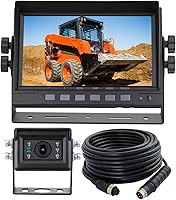
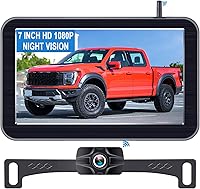
LeeKooLuu HD 1080P Backup Camera Plug: Best overall
- Wired 4-pin kit with 4.3-inch LCD monitor
- 1080P color image at 60FPS
- IP69 waterproof housing
- 150-degree lens with adjustable grid lines
- Suction bracket with 360-degree rotation
A complete wired kit for van rear visibility, with a compact monitor and a camera that handles rain, dust and rough roads.
Pros
- 25-minute install with plug-and-play cigarette lighter power
- IP69 housing rated from -22°F to 176°F
- Anti-shake chip keeps the picture steady on bumpy roads
Cons
- Wired cable run from the van's tailgate to the dash
- Monitor takes up dash or windshield space
This is the kit to start with for a typical cargo or passenger van. The LeeKooLuu bundles a 1080P camera and a 4.3-inch LCD monitor, and both share one cigarette lighter lead, so you don't wire two separate power sources.
A 4-pin video cable links the two, and the kit can also be tied to the reversing lights so the picture triggers when you shift into reverse. A manual switch is included too, so you can call up the rear view without being in reverse.
The 25-minute install claim covers a short cable run. Its 60FPS picture and anti-shake chip keep the feed steady when the van rattles over uneven pavement.
The IP69 housing is rated from -22°F to 176°F, and six white LEDs handle night backing. The suction bracket uses a 360-degree swivel, so you can angle the screen toward the driver's seat.
Its 150-degree view is narrower than the 170-degree picks here, so you see a bit less at the far corners. The 4.3-inch screen is also small for a long van.
The trade-off is compactness against coverage, and this kit lands on the compact side.
Brightness, contrast and image flip settings let you tune the picture to your seat height.
Pick it when you want a complete, simple system and your van's rear wall isn't much wider than a car's. Skip it for a stretched body where a 7-inch screen and longer cable help more.
WOLFBOX G840S 12" 4K Mirror Dash Cam: Best for replacing the rearview mirror
- 12-inch mirror dash cam with 4K front and 1080p rear cameras
- 170-degree front and 140-degree rear lenses
- 5.8GHz WiFi with GPS antenna
- 24-hour parking monitor with time-lapse
- 32GB card included
A mirror-style camera that widens the rear view and records front and rear video. Suits van drivers who want a clear view and a dash cam in one unit.
Pros
- 12-inch screen gives about 1.5 times the viewing area of a standard mirror
- Records both directions with GPS tagging
- 32GB card in the box
Cons
- Rear camera is a conventional 1080p lens, not a 4K one
- Parking monitor needs a separate hardwire kit
The WOLFBOX G840S replaces your rearview mirror with a 12-inch touchscreen. Its front camera records in 4K, the rear camera in 1080p, and the 170-degree front and 140-degree rear lenses cut blind spots more than a plain mirror.
The smart split-screen shows both feeds at once, and the 2.5D curved glass sits against the windshield like a normal mirror.
The screen gives about 1.5 times the viewing area of a standard mirror. GPS data shows on the display, and the WOLFBOX app streams and shares footage over 5.8GHz WiFi.
A 32GB card sits in the slot. The low-reflectivity LCD and WDR/HDR processing help balance harsh daylight and dim evening light.
Loop recording keeps the newest footage without you clearing the card.
For a van used for deliveries or family trips, the dual recording and parking monitor add real value. The rear camera's 140-degree lens is narrower than the 170-degree cameras here, so it's less about wide-angle reversing and more about the mirror view plus recording.
The parking monitor also needs a hardwire kit, which is sold separately.
Choose it when recording matters as much as reversing. For a pure rear-view job at the lowest fuss, the plug-and-play LeeKooLuu is simpler.
The touch controls also mean cleaning the screen takes a wipe rather than scrubbing at buttons.
Natika Backup/Front View Camera: Best for head units and custom installs
- Metal OEM-style housing
- HD 600TVL sensor with 135-degree wide lens
- IP69K sealed glue-filled body
- Works from 12 to 24 volts
- Switchable front, rear and tailgate-down view
A small metal camera for vans that already have a screen, with loop wires that let you set rear, front or downward tailgate views.
Pros
- Fits 12 to 24 volt vans
- Low 0.01 lux rating for dim loading areas
- Can be set as a front or rear camera
Cons
- Monitor not included
- Factory radios need a separate harness and programmer
Natika sells just the camera, so this is the pick for a van that already has a head unit or monitor with an RCA input. Its metal OEM-style housing looks close to a factory part and its IP69K glue-filled body is sealed against water and fog.
It's small enough to hide behind a plate or panel.
The 135-degree lens covers a wide rear view, and the 0.01 lux rating means it holds up in dim loading areas. It runs on 12 to 24 volts, so it suits both light vans and heavier 24V commercial models.
Loop wires let you switch it between rear view, front view and a downward tailgate view. That last setting helps when you mount it high on the rear doors.
The kit includes a 26 ft extension cable, a panel remover, zip ties, gaskets and tape, so the small parts you need for a tidy run are in the box. The camera-only format is its main limit.
If your van's radio has no RCA input, you'll need a separate harness and programmer. The image is rated at 720p, lower than the 1080P kits here.
It's the right call for custom installs, not for a first-time buyer who wants everything in one box.
Pemacom 1080P Magnetic Wireless Backup Camera: Best for quick swaps between vans
- Magnetic base with six NdFeB magnets and rubber coating
- 1080P camera with 7-inch HD monitor
- 2.4GHz WiFi signal rated to 33 ft
- 15,000mAh battery with 5W solar panel and USB-C charging
- IP69 waterproof body
A no-wiring camera that sticks to the van with magnets and runs on its own battery. Ideal when you move between vehicles or rent vans.
Pros
- Mounts in about a minute with no cable run
- Solar panel plus USB-C charging
- Dual video channels for a second camera
Cons
- Needs recharging or sunlight to keep running
- Wireless signal can weaken over 33 ft
Pemacom solves the cable problem by removing it. Six neodymium magnets in a rubber-coated base let you stick the camera to the van's rear panel in about a minute, and the 1080P feed goes to a 7-inch HD monitor over a 2.4GHz WiFi link rated to 33 ft.
Frequency hopping is meant to hold the picture steady when other signals crowd the area.
Power comes from a 15,000mAh battery with a 5W solar panel and USB-C charging. A full 5-hour charge is rated for up to 24 hours of use.
The IP69 body works from -22°F to 176°F, and dual video channels let you add a second camera. When the monitor is off, the camera drops into a sleep mode so the battery isn't drained between trips.
The 7-inch screen also has an anti-glare finish and adjustable brightness, contrast and saturation.
The trade-off is upkeep. A magnetic kit depends on sunlight or recharging, and the signal weakens past 33 ft.
For a single van parked outside, the solar panel keeps it topped up; for a van kept in a garage all week, plan to plug it in. That's the cost of skipping the cable run.
The camera's 170-degree view and F1.2 aperture still give it wide coverage and low-light reach.
LeeKooLuu Backup Camera Ease Install for Car: Best for USB-powered simplicity
- Wired 4-pin kit powered from a USB port
- 4.3-inch LCD monitor
- 1080P image with night vision
- IP69 waterproof housing
- Adjustable grid lines, brightness and image flip
A low-fuss wired kit for vans with a free USB outlet, since the monitor draws power from the port instead of a cigarette lighter.
Pros
- About 15 minutes to install
- Wired signal resists interference
- Night vision switches on automatically
Cons
- Needs an open USB port in the van
- Shorter listed view than the 170-degree picks
This LeeKooLuu kit takes the wiring idea and makes it lighter. The 4.3-inch monitor runs from a USB cable into a port in your van, so there's no cigarette lighter adapter or separate power lead to route.
LeeKooLuu says about 15 minutes from box to working camera.
The 1080P camera has night vision that switches on automatically, a 150-degree lens and IP69 sealing. Grid lines, brightness, contrast and image flip all adjust on the monitor.
The SC1346 sensor and anti-shake processing keep the picture readable on rough pavement.
The USB requirement is the deciding factor. Many modern vans have a spare port near the dash, but older work vans may not.
Its 150-degree view also matches the top pick rather than the 170-degree cameras here. The wired USB-powered connection stays free of interference, so the feed won't drop out like a weak wireless link.
The monitor is a windshield mount, which keeps it off the dash and out of the way of paperwork. If you have a free port and want the quickest wired kit, this one wins on simplicity.
ATPK 7-Inch Wired AHD Backup Camera System: Best for rough roads and heavy vans
- 7-inch 1080P AHD monitor
- Heavy-duty camera with 10G vibration resistance
- IP69K waterproof camera
- 4-pin screw-lock aviation connectors
- DC12-24V input with two camera inputs
A sturdy wired system built for work vans and rough surfaces, with screw-lock connectors that stay put when the van shakes.
Pros
- Handles 10G of vibration
- Wide 12-24V power range
- Two-year warranty
Cons
- Narrower 120-degree view than most picks
- Monitor is not waterproof
ATPTK builds this kit for vehicles that shake. The camera is rated to 10G of vibration, the body is IP69K sealed, and the connectors are 4-pin screw-lock aviation plugs rather than push-fit RCA.
That matters on a work van bouncing over gravel or a rutted depot yard.
The 7-inch monitor shows 1080P AHD and has a memory function that keeps your settings after power off. Power input runs from 12 to 24 volts and the monitor takes two cameras.
ATPTK backs the kit with a two-year warranty. Built-in TVS and ESD protection guard the screen against voltage spikes and static.
Three screen modes brighten the display by day and darken it at night so it doesn't glare.
Its 120-degree view is the narrowest in this roundup. For a van with a flat rear wall that's workable, but it covers less of the rear corners than the 150 and 170-degree cameras.
The monitor is also not waterproof, so mount it inside. A trigger wire turns the screen on when you reverse and returns it to the previous mode after.
Pick it for durability on rough routes over sheer field of view.
Yakry 7-Inch Plug and Play Wired RV Backup Camera: Best for long vans and camper conversions
- 7-inch IPS monitor with sunshade
- 1080P wired camera with 150-degree lens
- 66 ft cable
- IR night vision
- Monitor supports a second camera
A wired kit with a long cable for stretched wheelbases. The IPS screen and sunshade help in bright daylight.
Pros
- 66 ft cable reaches long vans
- IPS screen reduces glare
- Room for a second camera
Cons
- Needs a cable run along the full van length
- Wired kit takes more install effort than a magnetic one
Yakry's kit is built around a 7-inch IPS monitor with a sunshade, which keeps the picture readable in strong daylight. The 1080P camera uses IR night vision and a 150-degree lens, and the kit includes a 66 ft cable that reaches the back of a long van or a camper conversion.
The lens is built to avoid fisheye distortion.
The monitor takes two video inputs, so a second camera can go on a hitch or side wall. Image flip gives you a mirror view when the screen orientation feels off.
Yakry rates the kit's cable with a dual-layer shield and pure copper ends to protect the signal. The camera and monitor share one power supply, so the cigarette lighter plug covers both.
Its wired design is reliable, but the long cable run is the job. If your van is 20 ft or more from dash to tailgate, the 66 ft cable matters.
For a compact van, the shorter, faster LeeKooLuu kit is easier to fit. The IPS panel also holds its colors when you look at it from an angle, which helps when the screen sits low on the dash.
Choose Yakry for length and screen comfort.
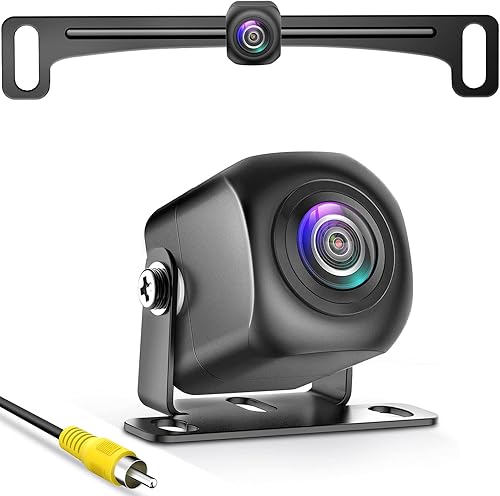
Pixelman AHD 1080P 170-Degree Backup Camera: Best for a wide, bright rear image
- AHD 1080P camera with 1/2.7in sensor
- 170-degree glass lens with F1.4 aperture
- Alloy housing sealed with nano waterproof glue
- HD and AHD signal switching
- Two mounting brackets
A camera-only pick for vans with an RCA screen, offering a wide lens and a large sensor for low-light backing.
Pros
- Wide 170-degree view
- Large 1/2.7in sensor for bright color
- Can switch to AHD for 1080P output
Cons
- No monitor in the box
- Defaults to 720P until you switch it to AHD
Pixelman's camera is for vans that already have a screen with an RCA input. Its 1/2.7in sensor is larger than the small chips in basic cameras, which boosts brightness and color when light is poor.
The 170-degree glass lens has an F1.4 aperture for low-light backing.
The alloy housing is sealed with nano waterproof glue and the camera ships with two brackets. The license plate bracket mounts without drilling into the body, so only the camera shows.
It defaults to 720P, so you'll need to switch it to AHD for 1080P if your monitor supports that signal. That mismatch between default and maximum output is worth knowing before you install.
Installation tools and accessories are included in the box.
Its RCA connector won't work with a dash cam or mirror camera, so confirm your screen type first. For a van with a good head unit and a tight mounting spot, the hidden plate bracket and wide view make this a solid camera-only choice.
The metal body also resists the seasonal expansion that cracks plastic housings. For a first install with no screen, a full kit serves you better.
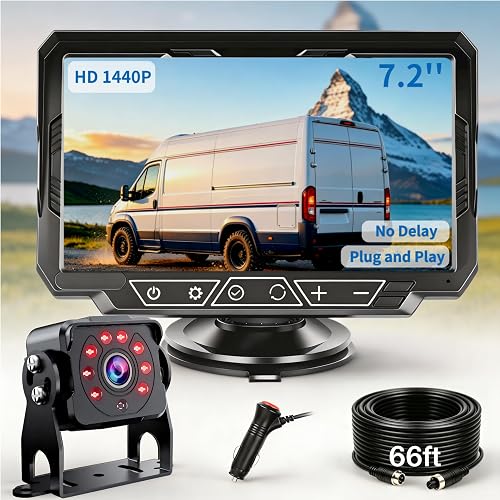
LeeKooLuu 1440P 7.2-Inch Truck Backup Camera: Best for loading docks at dusk
- 7.2-inch 1440P monitor with anti-glare sunshade
- 75FPS zero-lag picture
- 8 IR LEDs with up to 33 ft night vision
- 150-degree full-glass lens
- 66 ft extension cable with plug-and-play wiring
A high-resolution wired kit aimed at dark loading areas and long vans, with a big sunshaded screen and a long cable.
Pros
- 1440P screen with 75FPS feed
- Night vision rated to 33 ft
- 66 ft cable for long bodies
Cons
- The 170-degree figure in its specs conflicts with the 150-degree lens
- A 7.2-inch monitor is bulkier on the dash
LeeKooLuu's 1440P kit targets dark loading docks and long bodies. The 7.2-inch monitor shows a 1440P picture at 75FPS, so the feed stays smooth, and eight IR LEDs push night vision to 33 ft.
An anti-glare sunshade keeps the screen readable when daylight hits it. The BSI CMOS sensor and F/1.4 aperture hold detail in low light.
The kit includes a 66 ft extension cable and color-coded plug-and-play wiring, with a windshield suction mount and a rear screw mount in the box. Its 10ms response time is quick enough that the picture doesn't lag when you shift into reverse.
AHD/LVDS transmission and shielded coaxial cable carry the signal without the freezes of a wireless link. The all-metal housing is potted and sealed to IP69K, so it shrugs off rain and mud.
Its spec sheet lists both a 150-degree lens and a 170-degree view, so expect the 150-degree figure from the bullet text. Also, a 7.2-inch screen takes more dash room than the 4.3-inch kits.
The distortion correction keeps the wide image looking natural rather than stretched. Pick it if you back into dim bays and want the sharpest screen here.
How these van backup cameras were compared
We compared each kit on the specs that decide daily use in a van: how it's powered, how the signal reaches the screen, the field of view and the night vision rating. We also weighed install time, monitor size and what comes in the box.
Scores weigh those specs and features against what a van driver needs: a clear rear view, a stable signal and an install you can finish yourself. A camera-only unit scores well for a buyer with an existing screen and lower for a first-time buyer with none.
Wired kits score higher for signal stability, since the cable carries the picture without interference. Wireless and magnetic kits lose a little for battery upkeep or signal range, but gain points for install speed.
That's why the top three all bundle a camera and monitor.
Wired or wireless: which signal suits a van?
A wired kit sends the picture down a copper cable, so nothing in the air can break the feed. That matters in a van parked near warehouse Wi-Fi, toll readers or other vehicles with cameras.
The LeeKooLuu, Yakry, ATPTK and 1440P kits all take this route.
Wireless and magnetic kits skip the cable run. That's a real gain when you can't feed a wire through a van wall or when the camera moves between vehicles.
The cost is a power source for the camera and a signal that shortens with distance. The Pemacom kit rates its link to 33 ft, which covers most vans but leaves less margin on a long body with the monitor at the front.
If the rear view has to be there every time you shift into reverse, choose wired. If the camera needs to move or the cable run is impossible, choose magnetic and keep it charged.
What should you check before buying a van backup camera?
Start with your van's power and screen situation, then match the kit to them. That check rules out more products than any spec comparison.
Does your van already have a screen with an RCA input?
If your radio or head unit has a female RCA connector, a camera-only unit like the Natika or Pixelman saves money and dash space. If not, buy a kit with its own monitor.
A factory radio usually needs a separate harness and programmer to display a camera feed, so price that in before choosing a camera-only pick.
How is the kit powered?
A cigarette lighter plug needs a free 12V socket. A USB-powered kit needs an open USB port.
A magnetic kit runs on its own battery with solar backup. Check which port your van has spare before buying.
The LeeKooLuu USB kit is the easiest fit for vans with a modern dash port, while the cigarette lighter kits suit older models. A kit rated for 12 to 24 volts, like the Natika or ATPTK, also covers heavier commercial vans.
How long is your van from dash to rear?
Measure the cable path from the dash to your mounting spot and add a couple of feet of slack. The Yakry and LeeKooLuu 1440P kits include 66 ft cables, which cover long vans and camper conversions.
Shorter runs are quicker to fit, so a compact kit like the top pick finishes faster in a standard cargo van. If your van has a hinged rear door rather than a fixed wall, leave extra slack at the hinge so the cable isn't pulled tight when the door swings.
What field of view do you need?
A 170-degree lens covers the widest rear area, which helps when you back into tight bays or busy streets. The 150-degree picks are close behind, and 120 degrees suits a flat rear wall without wide corners.
Wider isn't always better: too wide a view can stretch the image at the edges. Pick 170 for tight maneuvering and 150 for general reversing.
The Pixelman lens is also built to avoid the fisheye curve that wide lenses often add.
Do you need night vision?
If you back into dim driveways, loading docks or garages, look for IR LEDs or a low lux rating. The top pick has six white LEDs and a 650 filter chip.
The LeeKooLuu 1440P kit lists night vision to 33 ft. The Natika's 0.01 lux rating is the lowest here.
A camera without IR still works in daylight, but dim backing gets harder. An anti-halo chip also helps stop bright lights from washing out the picture at night.
Should you buy a kit with a monitor or just a camera?
A kit with a monitor is the safer first buy, because you know the screen and camera work together. A camera-only unit makes sense when your van already has a screen and you want a cleaner dash.
Kits also come with the cable and mount, so the install is one purchase rather than several. If your van's radio is a factory unit, check what adapter it needs before you buy the camera alone.
Which van backup camera should you buy?
Buy the LeeKooLuu HD 1080P Backup Camera Plug as your aftermarket backup camera for van use if you want a complete wired kit that installs fast and handles weather. It's the strongest all-round choice for a standard cargo or passenger van.
Choose the WOLFBOX G840S when you want a wide mirror screen and front-plus-rear recording. Go with the Pemacom magnetic kit if you move between vans and hate running cables.
Pick the Yakry kit for a long wheelbase that needs a 66 ft cable.
If your van already has a screen, the Natika or Pixelman camera-only units keep the dash clear. For heavy-duty routes and shaking surfaces, the ATPTK kit's 10G rating and screw-lock connectors earn their place.
And for dim loading docks, the LeeKooLuu 1440P kit's night vision and sharp screen are worth the larger dash footprint.
For older vehicles that need a different fit, our aftermarket backup camera for older cars guide covers radio and dash options.
| Product | Best for | Screen size | Field of view | Waterproof rating | Our score |
|---|---|---|---|---|---|
| LeeKooLuu HD 1080P Backup Camera Plug | overall | 4.3 in | 150 degrees | IP69 | 9.7 |
| WOLFBOX G840S 12" 4K Mirror Dash Cam | replacing the rearview mirror | 12 in | 170 degrees | 9.7 | |
| Natika Backup/Front View Camera | head units and custom installs | 135 degrees | 9.5 | ||
| Pemacom 1080P Magnetic Wireless Backup Camera | quick swaps between vans | 7 in | 170 degrees | IP69 | 9.2 |
| LeeKooLuu Backup Camera Ease Install for Car | USB-powered simplicity | 4.3 in | 150 degrees | 9.0 | |
| ATPK 7-Inch Wired AHD Backup Camera System | rough roads and heavy vans | 7 in | 120 degrees | IP69K | 8.6 |
| Yakry 7-Inch Plug and Play Wired RV Backup Camera | long vans and camper conversions | 7 in | 150 degrees | 8.3 | |
| Pixelman AHD 1080P 170-Degree Backup Camera | a wide, bright rear image | 170 degrees | IP69 | 7.6 | |
| LeeKooLuu 1440P 7.2-Inch Truck Backup Camera | loading docks at dusk | 7.2 in | 150 degrees | 7.5 |
Our top 3 picks at a glance
-
1
-
2
Best for replacing the rearview mirror
WOLFBOX G840S 12" 4K Mirror Dash Cam
9.7/10 our score
See it on Amazon -
3
Best for head units and custom installs
Natika Backup/Front View Camera
9.5/10 our score
See it on Amazon
Frequently asked questions
Do I need a monitor with an aftermarket backup camera for a van?
Not always. If your van already has a radio or screen with an RCA input, a camera-only unit like the Natika or Pixelman works without a new monitor.
A full kit is easier if your van has no screen.
How long does a van backup camera take to install?
A plug-and-play kit can take about 15 to 25 minutes, since the camera and monitor share one power lead. Adding a cable run to the back of a long van takes longer, so plan an hour or so for a full-length cable.
Will a magnetic backup camera stay on at highway speed?
The Pemacom base uses six neodymium magnets with a rubber coating to protect paint. It is built to hold in extreme temperatures, but magnets work best on flat steel panels, so check your mounting spot.
Can a van backup camera work at night?
Yes. Kits with IR LEDs or a large low-light sensor produce a usable image in dim loading bays and unlit driveways.
Look for the night vision rating and the lux figure when comparing cameras.
Can I add a second camera to a van kit?
Some monitors take two video inputs. The ATPK and Yakry monitors accept a second camera, and the Pemacom supports dual channels.
That helps when you want a rear camera plus a side or hitch view.
What cable length do I need for a long van?
Measure from the dash to the rear mounting spot and add slack. The Yakry kit includes a 66 ft cable, and the LeeKooLuu 1440P kit also runs 66 ft, which covers long vans and stretched wheelbases.