How to Parallel Park Using a Reverse Camera
To parallel park using a reverse camera, align beside the car ahead so your rear bumper is level with its bumper, then reverse slowly while the screen shows the curb. Stop when the parking lines meet, swing the wheel back, and ease in straight.
On this page (11 sections)
- What should you do before you start the park?
- Where do you position your car next to the one ahead?
- How do you reverse into the space using the screen?
- How do you know when to stop?
- How do you straighten up and finish the park?
- How do you handle a tight spot or a curb?
- How do you set up the camera for parking?
- Which camera makes parallel parking easier?
- What mistakes make parallel parking harder?
- How do you park with a camera in rain or at night?
- What is the simplest way to parallel park with a reverse camera?
To parallel park using a reverse camera, line up beside the car ahead, reverse until your rear bumper clears its bumper, and steer while the screen shows the curb. Watch the parking lines close on the space behind, then swing the wheel back to straighten up.
The camera does one job well: it shows you the curb and the gap behind without twisting your neck. The rest still comes from the wheel, the mirrors and a slow, steady speed.
What should you do before you start the park?
Check the space is long enough and switch the camera on before you move. A reverse camera turns on with the gear selector, but confirm the screen has a clear picture first.
A parallel spot needs about one and a half car lengths. Measure by eye against your own car as you roll past.
If the space looks tight, keep driving.
Turn your hazard lights on and signal before you stop. Glance in the mirror for traffic coming up behind, because the camera only sees what is in its beam.
Set your mirrors so you can see the rear wheel and the curb. The camera and mirrors work as a pair, and the mirrors catch the car ahead that the screen misses.
Wipe the camera lens if it looks smudged. A dirty lens blurs the curb at the exact moment you need it sharpest.
Where do you position your car next to the one ahead?
Pull alongside the car in front so your rear bumpers sit level. Most cars line up well when the two rear axles match, and the camera confirms the gap.
Stop about 2 to 3 feet from the car beside you. Open the gap a little more for a wide car or a curb that curves.
With the camera in reverse, the car ahead should sit at the top edge of the screen or just out of view. The curb should run along the lower part of the frame.
If your screen shows the car ahead filling the whole picture, you are too close or too far forward. Pull up a foot and try again.
Now the screen shows the space behind you and the curb you are about to reverse along. That view is the cue to start turning.
How do you reverse into the space using the screen?
Reverse slowly and turn the wheel toward the curb as the rear swings in. The screen shows the gap closing, so keep the curb inside the outer parking line.
Hold the wheel at about a quarter to a half turn, depending on how wide the spot is. At walking speed, the rear end follows the curve you see on the screen.
Stop when the car ahead's rear corner appears in the camera view and the lines start to line up with the curb. That is your first checkpoint.
Straighten the wheel for a moment, then turn it back the other way to bring the front end in. Reversing in two arcs keeps the curb from clipping your rear tire.
Many drivers find the lines more useful than the raw picture. Set them so they trace your car's path when the wheel is straight.
The LeeKooLuu camera lets you adjust the parking lines to fit your vehicle.
How do you know when to stop?
Stop when the screen shows your car centered in the gap and the lines match the curb. If the car behind creeps into view, you still have room to adjust.
The lines are your ruler. When the outer line runs parallel to the curb and sits just inside it, the car is straight in the space.
Ease back until you feel or see the lines reach the car behind. Leave enough room to open the hatch or the trunk.
If the car looks angled on the screen, pull forward a little and reverse again with a smaller turn. Small corrections beat one big swing.
Check the mirrors before you open the door. A cyclist or a passing car can arrive while your eyes are on the screen.
How do you straighten up and finish the park?
Swing the wheel back to center and creep forward or back until the car sits square in the space. Then hold the brake, set the parking brake and check the gap on both ends.
Look at the screen one more time. The curb should run evenly along the lower edge and the lines should match.
If the front end is still out, reverse a touch more and turn the wheel toward the curb.
The wide lens bends the edges of the picture. Near the corners, objects look closer and rounder than they are.
Judge distance in the center of the screen and with the fixed lines.
A camera with a wide field of view helps here. The LeeKooLuu's 150-degree lens cuts the blind spots beside the rear bumper, but the center is still the part to trust.
Put the car in park, set the brake and switch the camera off. If your screen stays on in drive, use its one-click channel switch to move to another view or turn it off.
How do you handle a tight spot or a curb?
In a tight spot, turn later and use smaller steering inputs. The camera shows the gap shrinking, so stop early and adjust rather than forcing the car in.
A curb that rises steeply or a low wall changes the lines' meaning. Treat the curb as the edge and keep the outer line a hand's width away from it.
For a spot on a hill, hold the brake firmly and move in short nudges. The screen tells you where the bumper sits, but the brake controls the roll.
If the space is too short for your car, drive on. A camera cannot create room that isn't there.
How do you set up the camera for parking?
Mount the camera so the screen shows the bumper and the curb, and set the lines with the wheel straight. A low mount catches the curb; a high mount shows more of the road.
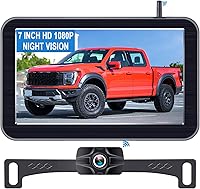
The LeeKooLuu kit pairs a wireless camera with a 7-inch monitor. The monitor runs from the cigarette lighter and the camera takes power from the reverse light.
Its night vision switches on automatically in low light.
Check the height before you tighten anything. A camera that looks straight back shows traffic but hides the curb right at your tires.
The field of view matters as much as the mount. A 150-degree lens like the LeeKooLuu's sees wide, while the VOONOA system's 170-degree cameras cover more of the side.
Which camera makes parallel parking easier?
A camera with parking lines, night vision and a screen you can see clearly in daylight makes the job easier. The lines do the measuring; the screen just needs to be readable.
Screen size is the practical choice. A 7-inch monitor like the LeeKooLuu's shows the curb and the lines without squinting.
The VOONOA's 10.36-inch screen suits drivers who want the widest view, though it takes more dashboard space.
Night vision matters for evening parking. The LeeKooLuu switches it on automatically, and the Yakry's infrared lights help on a dark street.
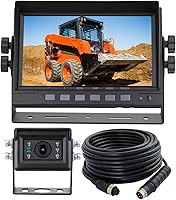
The Yakry kit is built for Furrion pre-wired RVs. It comes with a bracket and pigtail wire, and its signal reaches 825 feet in open areas.
For a pickup or an SUV, the 7-inch LeeKooLuu fits a standard license-plate mount on models such as the Ford F-150 or Toyota Tacoma.
For more choices by vehicle, see our picks for a backup camera for pickup truck, a backup camera for SUV and a backup camera for box truck. If you prefer a cable instead of a wireless link, a wired backup camera gives a steady picture without interference.
What mistakes make parallel parking harder?
The usual mistakes are turning too early, reversing too fast and trusting the screen's edges. Each one throws off the lines and makes the car look wrong in the space.
Turning early swings the rear into the curb. Wait until the lines reach the curb, then start the turn.
Reversing fast leaves no time to correct. Keep the speed at a slow walk and stop the moment the picture changes.
Staring at the screen and forgetting the mirrors is another trap. The camera cannot see the car ahead or traffic beside you.
Finally, don't rely on the wide lens for distance. Judge the gap by the fixed lines in the center of the screen, not by the curved edges.
How do you park with a camera in rain or at night?
Wipe the lens and rely on night vision and the lines when light drops. A clear lens matters more than any setting in bad weather.
Rain drops on the lens blur the curb. Carry a cloth and clear the lens before you start the park.
At night, the LeeKooLuu's starlight night vision and the Yakry's infrared lights keep the curb visible. The screen brightness may need a tweak so the lines stand out.
If glare from headlights washes out the picture, tilt the monitor away from the light. A suction mount makes that quick.
What is the simplest way to parallel park with a reverse camera?
Line up level with the car ahead, reverse slowly, and let the parking lines show the curb and the gap. Turn toward the curb, stop at the checkpoint, then swing back and straighten up.
The camera is a helper, not an autopilot. You still steer, brake and check the mirrors.
The lines just make the curb easier to judge.
For the camera itself, the LeeKooLuu 7-inch kit covers the basics with adjustable lines and automatic night vision. The Yakry kit suits a pre-wired Furrion RV, and the VOONOA quad system gives the widest view for a large vehicle.
Practice in an empty lot first. Set the lines with the wheel straight, then park the same way each time so the screen tells you the same story.
Frequently asked questions
Can you parallel park with only a reverse camera?
Yes. A reverse camera shows the curb and the car behind, so you can judge the gap without turning your head the whole way.
Still glance at your mirrors and over your shoulder, because the camera's wide lens leaves blind spots at the corners.
Where should the parking lines sit in the camera view?
Set the lines so they trace your car's outer edge when the wheel is straight. Then, when reversing, keep the curb just inside the outer line and stop when the lines close on the car behind.
Why does the screen look distorted while parking?
A wide-angle lens bends the edges of the picture, so objects near the corners look closer or curvier than they are. Judge distance by the center of the screen and the fixed parking lines, not by what appears at the very edge.
How far back should you reverse before turning the wheel?
Reverse until your rear bumper is roughly level with the front bumper of the car behind, or until the lines you set reach the curb. Turning too early clips the curb; turning too late leaves you too far from it.
Do you still need mirrors with a backup camera?
Yes. Mirrors show the sides and the car ahead that the camera misses.
The camera handles the curb and the space behind, while mirrors watch traffic coming up beside you.