What Do Backup Camera Lines Mean?
Backup camera lines are a distance and steering guide drawn over the rear image. The fixed colored bars mark roughly 3 feet, 2 feet and 1 foot from the bumper, and the moving lines bend with the wheel to show where the car will go.
On this page (9 sections)
- What do the different backup camera lines mean?
- What do the green, yellow and red lines actually mark?
- How do the moving steering lines work?
- Why are my lines off center or crooked?
- How do you calibrate the lines to your own car?
- What do the lines mean on a truck or box truck camera?
- Do the lines replace your mirrors and a spotter?
- How do backup camera lines differ from parking sensors?
- Which backup camera fits your car?
What do backup camera lines mean? They are a drawn-on guide that turns a flat rear image into something you can measure.
The colored bars mark distance from your bumper and the moving lines show your steering angle. Once you know the scale, you can judge a gap without leaving the driver's seat.
The lines don't replace your mirrors. They give you a reference point for the last few feet, which is where most low-speed bumps happen.
What do the different backup camera lines mean?
The colored bars are a distance scale in three steps, from the bumper outward. Green usually sits farthest away, yellow in the middle and red closest to the car.
Read them as a rough ladder: each band is a zone where your reaction should change.
Green means you still have room. Yellow means you're close enough that a person, curb or post should be in the camera view already.
Red means stop and check your mirrors before going any farther.
The exact footage behind each color varies by camera height and angle. A high lens on a pickup sees farther out than a low one under a sedan bumper.
Measure your own car once with a helper or a traffic cone, and the colors stop being abstract.
Many systems let you hide the grid if it gets in the way on a tight turn. The ATPTK system, for example, turns its distance grid on or off and adjusts it from the on-screen menu.
Look in your monitor settings before you assume the lines are fixed.
What do the green, yellow and red lines actually mark?
Most makers set the colors at about 3 feet, 2 feet and 1 foot from the rear bumper. That spacing is a convention rather than a law, and your camera may sit close to it or wide of it.
Green marks the outer edge of the zone you're monitoring. Yellow warns you that the next foot or two is running out.
Red marks the buffer right at the bumper, where a wheel stop, a low bollard or a child's toy can hide under the tailgate.
Treat the red band as your stop line for anything you can't see clearly. If an object is in red and you're unsure what it is, get out and look.
The lines tell you distance; they don't tell you what the object is.
Drivers of lifted trucks often find the lines short, because the camera sits higher. If your red band lands too close or too far, adjust the grid in the menu so the bottom line lines up with your bumper.
How do the moving steering lines work?
The moving lines are a predicted path, not a fixed ruler. When you turn the wheel, they bend to show where the rear of the car will travel.
Straighten up and they snap back to center.
This matters most when you reverse into a space between two cars. The curve lets you see whether your tail will clear the car on the inside of the turn before you commit.
Two things affect how well they match reality. The first is the camera's mounting angle; a tilted lens skews the curve.
The second is whether the system reads wheel position at all. Some cameras draw a static curve that doesn't react, which is a decorative line rather than a live one.
The GreenYi camera draws its trajectory from the car's moving direction, so the guide changes as the vehicle turns. It's not tied to steering wheel input.
The FEISIKE system takes a simpler route and lets you set the parking lines yourself to suit your car's size and how you park. That's a fixed grid you align once, not a live curve.
Why are my lines off center or crooked?
A crooked grid almost always means the camera is mounted at an angle. A lens tilted up, down or to one side throws the whole overlay off, so the center of the picture stops matching the center of your bumper.
Start with the mount. A license plate camera bolted slightly askew, or a trunk handle camera whose housing doesn't sit flush, will skew the lines.
Loosen the bracket, level the lens and check the image against a straight wall or a parked car behind you.
If the mount is square and the lines still lean, the monitor or camera menu should have a rotate or tilt setting. Adjust it until the bottom line sits level across the back of the car.
Distance errors are a separate problem. A camera mounted very high or very low reads the ground at a different angle, which stretches or squeezes the color bands.
In that case, move the lines in the menu rather than moving the camera.
How do you calibrate the lines to your own car?
Line the bottom line up with your bumper, then check each color against a known distance. It takes ten minutes and one helper or a few cones, and it makes the grid trustworthy.
- Park on flat ground with space behind you.
- Have a helper stand at 1 foot, 2 feet and 3 feet behind the bumper, or set cones at those marks.
- Open the camera menu and move the grid up or down until the red, yellow and green edges sit near those points.
- Check the steering lines by turning the wheel slowly and seeing whether the curve matches the space.
Repeat the check after you change tires, add a lift or swap the camera. A different ride height shifts the ground angle, and the lines drift with it.
Which camera suits a car that needs a custom grid?
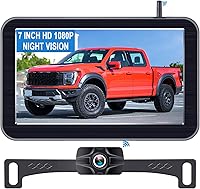
The FEISIKE kit suits drivers who want to set the lines themselves. Its adjustable parking lines are tuned to the vehicle's size and your parking habits, and the 7-inch 1080P IPS screen stays readable in bright sun.
The 150-degree lens and IR night vision help in tight, dim spaces.
It's a good fit for a sedan or crossover where a factory grid is missing.
What do the lines mean on a truck or box truck camera?
On a large vehicle, the lines mark a much longer stopping distance than on a car. A box truck's rear bumper sits high, so the ground nearest the camera may not show at all in the first foot.
Treat the colors as zones rather than exact feet. On a tall truck, the red band can sit several feet back from the bumper in real terms, so the last stretch to a loading dock needs a spotter or a walk-around.
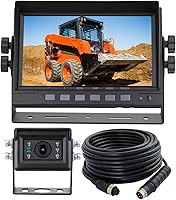
The ATPTK system runs on 12–24V and pairs a 7-inch 1080P monitor with a 120-degree heavy-duty camera rated IP69K for water and 10G for vibration. Its distance grid can be toggled and adjusted in the menu, which matters when the camera sits high on a flatbed or a box body.
Check our picks for a backup camera for box truck work if you tow or load at docks. Pickup owners can compare pickup truck camera options for a lower, plate-mounted view.
Do the lines replace your mirrors and a spotter?
No. The lines are a reference for the last few feet, not a full view.
The camera lens sees a narrow slice behind the car and can miss objects at the corners or under the bumper.
Use the camera and lines for the final approach, and keep checking both mirrors for what's outside the frame. A spotter still helps on a tight dock or a crowded lot, especially in a large vehicle with a long blind zone.
The lines also depend on light. A camera with night vision, like the FEISIKE kit's infrared mode, keeps the picture usable when the driveway is dark.
The lines draw either way, but you can't read them over a black screen.
On wet or dirty lenses, the image blurs and the lines lose their meaning. Wipe the lens before a tight reverse, and check that the camera housing hasn't shifted since you last calibrated it.
How do backup camera lines differ from parking sensors?
The lines are visual and drawn on the screen; parking sensors are audio or display warnings triggered by proximity. The two work well together, but they answer different questions.
The lines show you a path and a rough distance band. Sensors beep faster as you close in, and some cars show a graphic of which corner is near an obstacle.
Sensors catch low objects the camera might not frame well; the lines help you aim.
Some monitors show both at once, with the grid on the image and a sensor readout in a corner. If your car lacks sensors, the lines plus a slow approach and a walk-around cover most of the gap.
Neither system sees everything. A narrow post, a child, or a low curb can slip past a camera angle or a sensor beam.
The lines are a tool for judgment, not a substitute for it.
Which backup camera fits your car?
The right camera depends on how much room you need to see and whether you want a live steering curve. Cars and SUVs do well with a plate-mounted kit and a clear 7-inch screen.
Trucks and heavy equipment need a tougher camera and a wider voltage range.
For a car or crossover, see our picks for a backup camera for SUV. If you prefer a cable run over a wireless signal, compare the wired backup cameras with a monitor for a steadier picture.
Once you know what the colors and curves mean, the lines stop being decoration. Set them to your bumper, check the red band against a real object, and use them as a stop cue on the final foot.
That's what the lines on a backup camera mean in practice: a scale and a steering hint you can trust only after you've matched them to your own vehicle.
Frequently asked questions
Are the colored lines on a backup camera accurate?
They are close, not exact. The lines are drawn by the camera or monitor electronics, so the real distance depends on how high the lens sits and its angle.
Measure your own gap once with cones or a helper and treat the colors as a rough scale.
Can I turn the guide lines off?
Yes on most systems. Many monitors and cameras have a menu setting that shows or hides the grid, and some cameras let you adjust how far out the lines sit.
Check the settings menu before assuming the lines are locked on.
Why do my lines curve when I turn the wheel?
Curving lines are the dynamic steering guide. The camera reads your wheel angle and bends the trajectory to match, so the lines follow the path the rear of the car will take.
Fixed lines stay straight no matter how you turn.
Do backup camera lines work at night?
The lines still draw, but you only see them as well as the rear image. A camera with infrared night vision or a bright reversing light keeps the lines readable in a dark driveway.
Without light, the grid sits over a dark or grainy picture.
How do I adjust the lines on my camera?
Use the monitor or camera menu to move the grid up or down, and rotate it if the camera is mounted at an angle. Set the bottom line where your bumper sits, then check the next lines against a wall or a helper standing behind the car.