How Much Does a Backup Camera Cost?
A backup camera costs anywhere from budget to premium depending on type. A basic wired camera sits at the low end, a wireless magnetic kit like the Pemacom costs more, and installation extras such as longer cables push the total up.
On this page (7 sections)
- How much does a backup camera cost by type?
- What does a wired backup camera setup cost?
- What does a wireless or magnetic backup camera cost?
- What hidden extras add to the total cost?
- Does vehicle size change how much you spend?
- How much should you plan for installation?
- How do you set a realistic backup camera budget?
A backup camera costs anywhere from budget to premium depending on the type you buy. A basic wired camera sits at the low end, a wireless magnetic kit costs more, and installation extras like a longer cable push the total up.
The camera is only part of the bill. Your vehicle length, whether you already have a screen, and how you mount the camera all shape the final number.
This guide breaks the cost into the parts you actually pay for so you can set a budget you won't blow past.
How much does a backup camera cost by type?
Wired cameras cost the least and wireless kits cost the most. Between them sit camera-only kits and monitor bundles, and the gap comes down to how much hardware ships in the box.
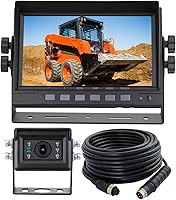
A plain wired camera is the entry point. It sends video down a cable to a monitor or head unit you already own, so you pay for the lens and a short cable.
That is why it is the cheapest way to add a reversing view.
A wireless kit replaces that long cable with a transmitter and receiver. It usually bundles a monitor, which means you pay for a screen and a camera in one box.
Magnetic wireless kits add a battery and a solar panel on top, and each part is another cost in the total.
Monitor bundles land in the middle. You get a camera plus a small display, but you skip the wireless hardware.
Pick the type first, then budget around it.
What does a wired backup camera setup cost?
A wired setup is the lowest-cost path, especially if you already have a screen. The camera and its cable do the work, and you avoid paying for a separate wireless link.
The main extra is cable length. The short cable in many kits is fine for a sedan or small SUV.
A pickup, box truck or trailer often needs more, and that is where an extension cable earns its place.
The EWAY cable runs 20 ft with male RCA ends and a built-in trigger wire. It also includes a female-to-female coupler and a DC power cord with a red 12 volt lead and a black ground lead.
That kit covers the run and the camera power in one buy, which keeps the extras to a single item.
If your monitor has no trigger wire, the red wire connects to the positive of the reversing light instead. That detail matters when you price the job, because a monitor without a trigger input needs that tap to switch the view automatically.
See our best wired backup cameras with a monitor for kits that pair well with this cable.
What does a wireless or magnetic backup camera cost?
Wireless and magnetic kits cost more because they bundle more parts. You pay for a transmitter, a receiver and often a monitor, plus a battery on the magnetic models.
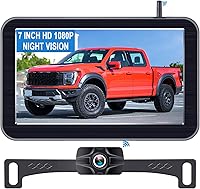
The Pemacom kit shows what sits inside that higher tier. It pairs a 7-inch HD LCD monitor with a 1080P camera, and the camera base holds six rare-earth magnets under a soft rubber layer so it grips without tools.
A 15,000mAh battery, a 5W solar panel and a USB-C charger are all part of the package, which is why this type carries the top of the range.
That bundle matters for cost planning. There is no long cable to buy and no drilling through the body, so the price you pay up front replaces both the camera and the labor of a wired run.
The wireless signal reaches up to 33 ft, which covers trucks, pickups, campers and small RVs.
A magnetic kit suits anyone who moves a camera between vehicles. One camera serves the truck and the trailer, so you avoid buying a second unit.
See our picks for a backup camera for a pickup truck if that describes your setup.
What hidden extras add to the total cost?
Cables, couplers and power leads are the usual extras, and they are easy to forget. Each one is a small line item, but together they can change your budget by a noticeable step.
When do you need an extension cable?
You need one when the cable in the kit is shorter than the distance from the camera to the monitor. Measure that route before you order, along the path the cable will actually take, not in a straight line.
The GreenYi cable runs 10 ft with double shielding and a trigger detection wire. It uses an oxygen-free copper core with a copper mesh and aluminum foil layer to cut interference.
A female-to-female RCA coupler and a power cable are in the box.
GreenYi says the shielding keeps the signal clear over long distances. That is the maker's design claim, and it explains why a shielded cable is worth the small extra over a plain one.
If your run is short, this 10 ft cable may be all you need.
What about a monitor or head unit?
If you already have a radio or head unit with a yellow RCA video input and a reverse trigger wire, you skip the monitor cost. If not, a monitor bundle or a wireless kit with a screen is the simpler buy.
Decide this before you shop, because it is the single biggest swing in the total.
Does vehicle size change how much you spend?
Yes, longer vehicles usually cost more because they need longer cables. A sedan may work with the cable in the box, while a box truck or camper often needs an extension.
A pickup with a long bed adds a few feet to the run. A box truck adds more.
A trailer or camper can need the most, and a wired run to a trailer also needs care at the hitch point where the cable flexes.
That is why a wireless kit can be the better budget choice for long rigs. The Pemacom's 33 ft signal range covers most truck and trailer setups without any cable.
You pay more for the kit but skip the cable and the labor, so the two paths often land close together.
For box trucks, check our guide to the backup camera for box truck setups that handle the longer distance and the higher mounting point. SUV owners have an easier time, and our backup camera for SUV picks cover the shorter runs.
How much should you plan for installation?
Plan for either a DIY install or a paid one, and factor the labor into your budget. A wired camera needs a cable routed from the rear to the dash, which takes time and some trim removal.
A wireless or magnetic camera is the DIY-friendly route. The Pemacom mounts on its magnet base and the monitor sits on a suction cup, so there is no cable to fish through the body.
For many drivers that saves the cost of a shop visit.
If you pay for installation, the price depends on your vehicle and the route. A short run in a sedan is quick work.
A long run through a box truck or a trailer hitch takes longer and costs more. Ask for a quote before you commit to a wired kit.
How do you set a realistic backup camera budget?
Set your budget by kit type first, then add the extras your vehicle needs. Decide whether you already have a screen, measure your cable run, and only then pick a model.
Start with the screen question. If you have a head unit with a video input, a wired camera plus a cable is the leanest path.
If you don't, a monitor bundle or a wireless kit saves you buying a screen later.
Then measure the run. A short cable is fine for a car or small SUV.
A long pickup, box truck or camper needs an extension, and the EWAY 20 ft cable covers that plus the coupler and power lead. For a shorter run, the GreenYi 10 ft cable does the job.
Finally, weigh the wireless premium. A magnetic kit like the Pemacom costs more up front, but it removes the cable and the install labor.
For a rig you move between vehicles, or one where routing a cable is hard, the wireless kit is the better value.
When you're ready to compare models by vehicle, our wired backup camera guide and the pickup truck and SUV picks narrow the field. Budget the camera type first, then the cable, and the total cost of a backup camera stops being a surprise.
Frequently asked questions
How much does a backup camera cost in total?
It depends on the type you choose. A basic wired camera is the cheapest route, a wireless magnetic kit costs more, and cable or coupler extras add a small amount on top.
Plan your budget around the kit type first, then the accessories.
Why do wireless backup cameras cost more than wired ones?
Wireless kits bundle a transmitter and receiver, and magnetic models like the Pemacom also include a monitor and a rechargeable battery. Those parts replace a long video cable but add hardware, so the kit costs more than a plain wired camera.
Do I need to buy an extension cable with a backup camera?
Only if the cable that comes with your camera is shorter than the run from the rear of your vehicle to the monitor. Long pickups, box trucks and RVs often need one.
Measure the route before you order so you buy the right length once.
What else adds to the cost besides the camera?
Cables, couplers, a power lead and a monitor are the common extras. Some kits include the monitor and some do not.
Decide whether you already have a screen or head unit that accepts a video input before you budget.