How to Flip a Reverse Camera Image
To flip a reverse camera image, open the monitor's menu and change the image setting from mirror to normal, or toggle the mirror switch on the camera body. If there's no setting, the camera may be mounted upside down or pointed at a mirror.
On this page (9 sections)
- How do you know the reverse camera image is actually flipped?
- Where is the image flip setting on a backup camera monitor?
- How do you flip the image on the camera itself?
- What should you do when there is no image-flip setting?
- How do you fix an image that is mirrored because of the mount?
- How does the monitor wiring affect a flipped image?
- How do you set the correct image for each camera in a multi-camera system?
- How do you check the view and parking lines after flipping the image?
- When should you replace the camera or monitor instead of flipping the image?
To flip a reverse camera image, open the monitor's menu and switch the image setting from mirror to normal, or toggle the mirror switch on the camera body. If neither exists, the camera is mounted upside down or aimed at a mirror, and the fix is physical.
A mirrored backup picture makes left and right read backwards, so a curb on your right appears on the left of the screen. That small confusion matters most when you reverse into a tight space.
This guide walks through the settings, the hardware checks and the wiring cases so the view matches reality before you trust it.
How do you know the reverse camera image is actually flipped?
A flipped image shows text and known objects reversed, so a stop sign reads backwards and the driver's side of your own vehicle appears on the wrong side of the screen.
Test it in a safe spot with the vehicle parked. Have someone stand behind the car, then move to the left and right while you watch the monitor.
In a normal view, a person on the left of the car appears on the left of the screen.
Also look at any letters or numbers in view, such as a license plate or a painted sign. A mirrored camera shows them reversed.
Once you confirm the picture is flipped, you know whether to change a setting or a mount.
Where is the image flip setting on a backup camera monitor?
The setting lives in the monitor's on-screen menu, usually under a label like Image, Camera, Parking, or Settings. Open the menu with the buttons or remote, find the mirror or reverse option, and change it.
Most monitors offer a mirror mode and a normal mode. Mirror mode makes the picture read like a rearview mirror, which many drivers prefer for a rear camera.
Normal mode shows the scene as a camera sees it.
The exact path varies by brand and model. Write down the mode you started in so you can return to it if needed.
What do mirror and normal mean on a backup camera?
Mirror mode reverses the picture left to right, so the screen reads like a rearview mirror. Normal mode shows the raw camera view, matching the direction the lens points.
Set each camera to the mode that matches its job. Rear cameras often use mirror; front and side cameras use normal.
A front or side camera set to mirror flips the world and makes steering corrections go the wrong way.
How do you flip the image on the camera itself?
Some cameras have a small mirror switch, a jumper, or a menu button on the housing, so you can change the picture without touching the monitor. Turn the switch or move the jumper and the camera sends a flipped signal.
Check the camera body for a tiny recessed button or a two-pin jumper under a rubber plug. A few models let you hold a button for a few seconds to cycle modes.
If yours has no control, the flip has to happen at the monitor.
Cameras that arrive pre-set to mirror mode are common on trailer and RV kits. That default suits a rear view but not a front-facing one, so confirm the mode before mounting.
What should you do when there is no image-flip setting?
When the monitor and camera both lack a flip control, the picture is fixed and the mount is the only lever. Remount or rotate the camera so the lens sees the scene in the correct orientation.
Turning a camera upside down flips the image top to bottom. That helps when the picture is inverted vertically, not when it is mirrored.
For a mirrored view with no setting, you usually need a different monitor or camera.
Check the maker's support page for a hidden mode first. A quick call to support can save a return.
How do you fix an image that is mirrored because of the mount?
A camera mounted facing the driver or aimed through a mirror produces a mirrored-looking picture even with correct settings. Point the lens directly at the scene and away from reflective surfaces.
This happens most on vans and box trucks where the camera sits high and aims down at a polished bumper. It also happens when a camera is fitted to a windshield or interior mirror housing.
Reposition the bracket so the lens sees the road without a mirror in the path.
Can a wireless kit make the image easier to correct?
Yes. A kit that pairs the camera and monitor as a set usually gives you a menu on the monitor with a mirror option, so the flip is one button press.
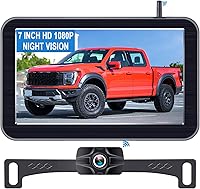
The Pemacom kit is a 1080P wireless system with a 7-inch HD monitor and a 170-degree view. It has dual video channels for a second camera, and its parking assist lines help with reversing.
The magnetic base uses six NdFeB magnets under a soft rubber layer, so you can move the camera between vehicles without drilling. Pemacom says a full 5-hour charge runs up to 24 hours.
For a pickup, a wireless kit removes the long cable run from the tailgate to the cab. Compare options in our guide to the best backup camera for pickup truck if you are still choosing.
How does the monitor wiring affect a flipped image?
A trigger wire sends the reverse signal to the monitor, so the screen switches to the camera view when you shift into reverse. Wrong trigger wiring can show the camera in an unexpected mode or fail to switch at all.
If the monitor shows the backup image only when you press a button, the trigger wire may not be connected. If the image is mirrored, the trigger wire is not the cause, so fix the image setting first.
A monitor with a built-in reverse wire needs that connection to activate the camera input.
When do you need an extension cable with a trigger wire?
You need one when the camera sits far from the monitor and the supplied cable is too short. A trigger lead in the same cable carries the reverse signal without a separate run.
The EWAY 20ft cable is a double-ended RCA video lead with a built-in trigger wire. It comes with a female-to-female coupler and a DC power cord with red and black leads.
EWAY's trigger wire only matters if your head unit or monitor has a reverse trigger input. The nickel-plated plugs and dual shielding reduce interference over the longer run.
What about a shorter cable run?
A shorter cable suits cars, SUVs and short-bed trucks where the supplied lead already reaches. Look for shielding so the video stays clean over the run.
The GreenYi 10ft cable is an oxygen-free copper RCA lead with copper mesh and aluminum foil shielding. It includes a trigger wire, a female-to-female coupler and a power cable.
GreenYi says the shielding limits EMI and RFI interference. The PVC jacket resists heat and wear, so it can run under carpet or trim.
How do you set the correct image for each camera in a multi-camera system?
Set each camera to its own mode rather than flipping the whole system. A rear camera usually takes mirror mode, while front and side cameras take normal mode.
Open the monitor's camera menu and select each input in turn. Change the mirror setting per channel if the monitor supports it.
Then drive forward slowly and check that each view matches the real direction. On a box truck or van, the front view should read normal so turns go the way you steer.
See backup camera for box truck for mounting tips on long bodies.
How do you check the view and parking lines after flipping the image?
After the flip, confirm that the picture and the guidelines match the real world. Park near a curb or painted stall, then compare the screen with your mirrors.
Check that a curb on your right appears on the right of the screen. Then confirm the guideline overlay lines up with the stall edges.
If the lines sit on the wrong side, the monitor may draw its own lines in a separate menu.
Practice a reverse into a marked stall after the change. Our guide to how to parallel park using reverse camera covers the technique once the image reads correctly.
When should you replace the camera or monitor instead of flipping the image?
Replace the gear when the picture stays mirrored after every menu and mount check, or when the monitor has no image menu and the camera is fixed. At that point the system can't give you a normal view.
A replacement also makes sense when the monitor is small or dim and the mirror setting is buried. Many drivers upgrade to a kit with a clear 7-inch screen and a simple image menu.
If you drive an SUV or crossover, our guide to the best backup camera for suv covers kits with larger displays. Check the camera's mounting type before buying, since a magnetic base moves between vehicles and a bracket does not.
Start with the monitor menu and the camera mount, since those fixes cost nothing. Only then look at the wiring and the gear.
Once the picture reads correctly, do a slow test in a quiet lot. Reversing with a mirrored view is a habit worth breaking before your next tight park.
Frequently asked questions
Why does my backup camera show a mirrored image?
A mirrored picture usually means the monitor is set to mirror mode or the camera has its image-flip setting turned on. Many makers ship cameras in mirror mode by default so a rear view reads like a rearview mirror.
Can I flip the image without a menu button?
If your monitor has no image menu, look for a small mirror switch or a jumper on the camera housing. Some cameras are fixed, so the only fix is to remount the camera in the correct orientation.
Should a front camera be flipped?
Yes. A camera facing forward should show a normal, non-mirrored view so left and right match what you see through the windshield.
Set it to normal mode, and set any rear camera to mirror only when you want a mirror-style view.
Does flipping the image affect the parking lines?
On most systems the guidelines flip with the picture, so a mirrored view shows mirrored lines. After changing the mode, check the guidelines against a curb or painted stall before you rely on them.