Why Does My Backup Camera Only Work Sometimes?
A backup camera that works only sometimes almost always has an intermittent connection, usually a power or ground tap that shifts with the vehicle. Check the reverse light splice, the ground point and the RCA plugs before you suspect the camera itself.
On this page (10 sections)
- Why does my backup camera only work sometimes?
- How do you find the fault when the camera comes and goes?
- What causes a camera signal to cut in and out?
- Why does the camera work when parked but not while driving?
- When is the cable the real problem?
- How do you check the monitor and camera separately?
- Does a wireless camera still work only sometimes?
- How do you stop an intermittent camera fault from coming back?
- Which cable should you buy for an intermittent signal?
- What should you do next?
A backup camera that works only sometimes almost always has an intermittent connection, usually a power or ground tap that shifts with the vehicle. Check the reverse light splice, the ground point and the RCA plugs before you suspect the camera itself.
Intermittent faults are hard to see because the camera works fine when you look at it. The fix starts with understanding what carries the signal and where the weak points sit on most installations.
That is why a backup camera only works sometimes in reverse and looks fine the rest of the time.
Why does my backup camera only work sometimes?
The camera loses power or loses video for a moment, and either one blanks the screen. Power faults show up as a dead screen.
Video faults show up as a screen that stays lit but goes blue or black.
Most aftermarket setups run on three paths. Power comes from the reverse light circuit, ground goes to the body, and video travels down a long RCA cable.
Any of the three can make contact only when the car sits at a certain angle or temperature. Once you know which path failed, the repair is usually quick.
See how do backup cameras work for the full signal chain.
How do you find the fault when the camera comes and goes?
Start at the reverse light tap and work backward toward the monitor, wiggling each connection while a helper watches the screen. The spot that changes the picture is your fault.
- Put the vehicle in reverse with the parking brake set and the key in the accessory or on position, or with the engine running, so the camera has power.
- Wiggle the splice at the reverse light and watch the monitor.
- Repeat at the camera plug, the monitor plug and the ground bolt.
- Note whether the screen dies or only the video drops.
Do this in a quiet spot so you can hear a relay click or a monitor power cycle. A screen that goes fully dark points to power.
A screen that stays on with no picture points to video. That split saves you from replacing the wrong part.
What causes a camera signal to cut in and out?
Loose splices, corroded grounds, crushed cable and heat are the four usual culprits. Each one behaves a little differently, which helps you narrow it down.
The reverse light splice
Many cameras grab power from a reverse light wire with a quick connector. Those clips loosen with vibration and can bite into insulation without touching copper.
A splice that only touches sometimes gives you the occasional picture.
Solder and heat-shrink the joint, or use a proper crimp connector, then tape it against strain. This is the most common single fix for a camera that works intermittently.
A weak ground
Ground faults hide well. Paint, rust or a loose bolt under a trunk trim panel raises resistance, so the camera browns out over bumps.
Move the ground to clean bare metal and tighten it firmly.
Cable damage in the tailgate or hatch
A cable routed through a hinge or rubber boot flexes every time you open the tailgate. Strands break inside the jacket and touch only at some angles.
Run your hand along the cable and look for a flattened or pinched spot. Replacing the damaged length is the fix, not taping over it.
Heat and cold
A connection that grips when cold can loosen when warm. If the camera fails after the car sits in the sun but works in the morning, suspect a soft plug or a splice under heat.
Re-seat every plug and replace any that no longer clicks.
Why does the camera work when parked but not while driving?
Vibration moves the loose part away from contact once the wheels turn. A parked wiggle test can miss a fault that only appears over rough pavement.
Have someone watch the screen while you drive slowly over a speed bump or a patch of broken road. If the picture drops on impact, the fault is almost certainly a mechanical connection.
Look at a splice, a plug or a damaged cable.
Fixing it means re-crimping or replacing that part, not buying a new camera.
When is the cable the real problem?
When the camera and monitor both test fine on a short lead, the long cable run is the fault. Long RCA runs pick up interference and hide broken strands, so they fail more often than the devices at each end.
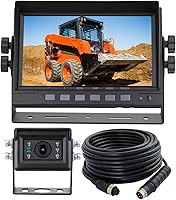
A double-shielded cable carries the video signal with less noise, and the GreenYi cable is built for that job. Its oxygen-free copper core sits inside a copper mesh and aluminum foil wrap, which GreenYi says shields against EMI/RFI interference.
The 10 ft version comes with a female-to-female RCA coupler and a trigger wire.
This suits a car, SUV or small pickup where 10 ft covers the route from tailgate to dash. The trigger wire connects to a monitor that has a backup trigger input.
Skip it if your run is longer than 10 ft. The coupler lets you join two cables but adds another connection point.
How do you check the monitor and camera separately?
Feed the monitor a known-good video signal, then test the camera on a short cable. This takes the guesswork out of which end failed.
For the monitor, plug in a DVD player or another camera with a yellow RCA output. If the picture is steady, the monitor is fine.
For the camera, run a short cable straight from camera to monitor without the long run. A stable picture means the camera works and the fault is in the long cable or a splice.
If both tests pass but the installed system still drops out, go back to the power and ground joints. The devices are healthy and the installation is the problem.
Does a wireless camera still work only sometimes?
Yes, a wireless camera can drop out too, but the causes are different. Power, interference and receiver placement replace the long cable as the weak points.
A wireless camera still needs steady power at the tailgate and a receiver near the monitor. A 2.4GHz link can weaken near dense buildings, busy traffic or a poorly placed receiver.
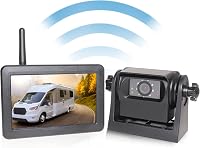
The Pemacom kit uses frequency hopping on 2.4GHz to hold the link, and Pemacom says its signal reaches up to 33 ft.
It suits trucks, pickups, trailers and small RVs where a cable run through the body is awkward. The base holds with six magnets and the battery recharges from a 5W solar panel.
Check the receiver position first if the picture stutters, since a moved receiver often fixes a weak link. See best backup cameras for a pickup truck if you are still choosing a kit.
How do you stop an intermittent camera fault from coming back?
Fix the connection properly, then protect it from movement and water. A repair that lasts uses solder or a crimp, not a twist and tape.
- Heat-shrink every splice and tape it against strain.
- Ground to clean bare metal and seal the bolt head.
- Route cable away from hinges and sharp edges, with slack at the tailgate.
- Use dielectric grease on plugs that see rain or road spray.
- Re-check the plugs after the first week of driving.
If the fault returns after a proper repair, the cable itself may be damaged inside the jacket. Replacing that length is cheaper than chasing the same fault twice.
Compare best backup cameras for a box truck if you are ready to upgrade the whole system.
Which cable should you buy for an intermittent signal?
Buy a shielded cable long enough for the full run with a little slack, and match its connector to your monitor. The EWAY cable runs 20 ft and includes a female coupler and a DC power lead with red and black wires.
EWAY describes the plugs as nickel plated and the cable as copper braided with aluminum foil shielding to cut EMI/RFI interference. That length fits regular passenger cars, SUVs and pickups.
Pick the 10 ft GreenYi for a compact car or a short route and the 20 ft EWAY for a longer body. If you drive an SUV or crossover, see best backup cameras for an SUV before you commit to a kit.
What should you do next?
Test the power tap and ground first, then the long cable, because those are the parts that fail on a camera that works only sometimes. A camera that works intermittently is nearly always an installation fault, not a dead device.
Fix the splice and ground properly before you spend money on new hardware. If the cable run is the weak point, a shielded replacement is the sensible buy.
Then re-test in reverse and over a bumpy road to confirm the picture stays steady.
Frequently asked questions
Can a bad ground cause a backup camera to cut in and out?
Yes. A weak or corroded ground makes the camera's voltage drop in and out as the body flexes over bumps.
Move the ground to clean bare metal on the chassis and tighten it fully before chasing other faults.
Why does the camera work in the morning but not after the car sits in the sun?
Heat expands and softens connections, so a plug or splice that grips cold can loosen when warm. Look for a loose RCA collar or a taped splice near the monitor or the camera, and re-seat or re-crimp it.
Do wireless backup cameras fix an intermittent signal?
Not always. A wireless camera removes the long RCA cable but still needs a steady power source, and a weak 2.4GHz link can drop near buildings or dense traffic.
Check the power tap and the receiver placement first.
How do I know if the camera or the wiring is the problem?
Test the monitor with a known-good video source and test the camera on a short cable. If the picture is stable both times, the fault is in the long run of cable or its splices rather than in either device.