How Do Backup Cameras Work?
A backup camera works by capturing the view behind your vehicle and sending that video to a screen near the driver. A wired cable or wireless signal carries the picture, and a trigger wire or the reverse gear tells the screen to switch on when you back up.
On this page (10 sections)
- What are the parts inside a backup camera?
- How does the camera send video to the driver?
- How does the screen know you're reversing?
- How do you run the wiring from the rear to the dash?
- How does the camera handle night driving and weather?
- What can the monitor add to the picture?
- Why do some backup camera images look wrong?
- What's the difference between a backup camera and a dash cam?
- What should you check before buying a kit?
- How do backup cameras work when you're done?
A backup camera works by capturing the view behind your vehicle and sending that video to a screen near the driver. A wired cable or wireless signal carries the picture, and a trigger wire or the reverse gear tells the screen to switch on when you back up.
The rest is a chain of small parts that have to line up: a lens, an image sensor, a video path, and a display. Knowing each link helps you spot why a kit looks wrong or won't turn on.
That answer is also why so many installs fail at the trigger wire or the monitor input, not at the camera itself.
What are the parts inside a backup camera?
Four parts do the work: a lens, an image sensor, a video processor and a housing. The lens gathers light, and the sensor turns that light into an electrical signal.
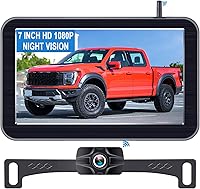
Most vehicle kits use a CMOS sensor, the same type found in phones. The Pemacom kit, for example, pairs a CMOS image sensor with a 1080P color chip and a 7-inch HD LCD display.
A wide lens spreads the view, so the image covers more than a small center patch behind the bumper.
The processor handles color, brightness and contrast, then hands the video to the cable or wireless transmitter. The housing matters more than people expect: dust, water and vibration are what kill cheap cameras first.
The Pemacom unit carries an IP69 waterproof rating and works from -22°F to 176°F.
How does the camera send video to the driver?
The video travels either down a cable or over a short wireless link, and the monitor turns that signal into a picture. Wired kits run a video cable from the tailgate to the dash.
Wireless kits skip the long run and send the image to a receiver near the screen.
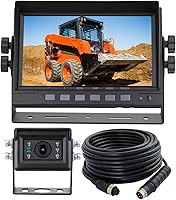
A wired path is stable because nothing shares the channel. A 20 ft RCA video cable with a built-in trigger wire, like the EWAY cable, handles most passenger cars, SUVs and pickups.
Its dual shielding, copper braid plus aluminum foil, cuts the electrical noise that causes wavy lines.
Wireless is easier to fit but depends on distance and obstacles. The EWAY magnetic kit sends over 2.4GHz WiFi with a stated range up to 100 ft in open space.
Before you rely on one, read our answer to do wireless backup cameras work.
How does the screen know you're reversing?
A trigger wire or the monitor's reverse setting tells the screen to show the camera feed. In many head units the trigger wire connects to the reverse light circuit.
When you shift into reverse, the light comes on and the radio switches to its video input.
Standalone dash monitors usually run from the cigarette lighter and stay on while the vehicle runs. Some switch by sensing the camera's signal, and others need a menu tap.
The EWAY cable's trigger wire sends that reversing signal to a GPS navigator or head unit that has a matching trigger wire.
If your monitor has no trigger wire, the red lead on the video cable can tap the positive wire of the reversing light. That way the display changes to the rear view as soon as the gear engages.
Get this connection wrong and the camera will only appear when you press a button.
How do you run the wiring from the rear to the dash?
Plan the cable route along the frame or sill before you mount anything. A clean run hides the cable behind trim panels, through the tailgate grommet and under the door sills to the dash.
Measure the path first. A 20 ft run suits sedans, SUVs and most pickups, while longer vans and trailers need more.
The EWAY 20ft RCA cable includes a female-to-female coupler so you can join two runs without cutting a good cable.
Keep the video cable away from power wires where you can. Route it opposite the reversing lamp wire when the panels allow, and keep connectors dry.
A grommet or a dab of sealant at the tailgate pass-through stops water reaching the plug.
At the dash, plug the yellow RCA end into the monitor's video input. Connect the red trigger lead only if your radio or monitor expects it.
Label the ends before you feed them so you don't guess later.
How does the camera handle night driving and weather?
Night vision comes from infrared LEDs or a low-light sensor, plus help from your reversing lamps. When light falls, the camera switches to black and white or boosts gain to keep the image usable.
The EWAY kit has 9 IR lights and an auto light sensor that turns them on in the dark. The Pemacom camera uses its sensor and algorithm to reduce glare and keep colors closer to real.
Both approaches work best when the lens stays clean.
Weather protection decides how long the picture stays sharp. Look for an IP rating that suits where you park.
Pemacom states IP69 for its camera, and EWAY states IP68P for its trailer camera, rated to sit in water up to 1.5 meters for 30 minutes. Even a well-sealed lens needs a wipe after a muddy drive.
What can the monitor add to the picture?
Many monitors overlay parking guidelines, adjust brightness and contrast, and split the screen between cameras. These features change the picture after it arrives, not the camera itself.
The Pemacom kit lets you adjust brightness, contrast and saturation and adds built-in parking assist lines. It also has dual video channels, so a second camera can cover a side blind spot.
The EWAY kit's 5-inch monitor splits the screen between two channels and lets you set the guide lines yourself.
Two things to keep straight. Guide lines help you judge distance but don't measure a gap for you.
A mirrored setting keeps the view reading like a rear view mirror. Check both in an empty lot before you trust them near a loading dock.
Why do some backup camera images look wrong?
Most wrong-looking images come from mounting angle, mirror settings or a weak wireless link. A camera tilted too high shows sky instead of the bumper, and a lens set too low fills the screen with asphalt.
Start with the angle. The camera should see a little of your own bumper for reference and the ground several feet back.
Then set mirrored or normal view so left stays left when you turn your head.
Wireless interference shows up as frame drops or a delay. Frequency hopping helps, and the Pemacom receiver uses it to keep a steady image.
A magnetic mount makes moving or removing the camera easy for hitching a trailer. Owners of bigger rigs should also compare the backup camera for box truck choices, which favor wider views and longer ranges.
What's the difference between a backup camera and a dash cam?
A backup camera shows a live rear view to help you reverse; a dash cam records video for later review. Many dash cams can take a second rear camera, but the screen stays pointed at the road ahead.
If you need footage after an incident, a dash cam is the tool. If you need to see the trailer hitch, a parking spot or a child behind the bumper in real time, a backup camera is the tool.
Some newer kits try to do both, so read what the monitor can store before you count on it.
For a daily driver, a 5-inch monitor kit keeps the dash clear. Pickup owners often want a longer range and a mount that stays put on a metal bumper, so the backup camera for pickup truck picks are worth checking.
What should you check before buying a kit?
Check the monitor size, the mount type, the range and how the kit is powered before you buy. A kit that fits a hatchback may not suit a crew cab or a trailer with a long run to the dash.
Magnetic mounts like the Pemacom base with six rare-earth magnets and a rubber coating suit people who move the camera between vehicles. A screen kit that plugs into the cigarette lighter avoids cutting into the vehicle's wiring.
A head unit install needs the RCA cable and a trigger wire, and the EWAY cable covers that job for most cars.
If your vehicle is an SUV, a hatch-mounted kit with a longer cable and a clear night view is the easier fit, and our backup camera for SUV roundup compares the options. Match the kit to the vehicle first, then the picture quality.
How do backup cameras work when you're done?
Once you know how do backup cameras work, the install gets simpler: mount the camera, run the signal, wake the screen on reverse, and set the angle and mirror. The picture is only as good as the weakest link, so a clean lens and a dry connector matter as much as resolution.
Here's how to choose. Pick a magnetic wireless kit like the Pemacom if you want a quick fit and move it between vehicles.
Pick a wired kit with the EWAY 20ft RCA cable if your head unit has a video input and you want a stable picture. Pick the EWAY magnetic kit if a small 5-inch screen and a 100 ft wireless range suit your rig.
Frequently asked questions
Does a backup camera record video?
Most backup cameras only show a live picture and do not record. Recording needs a separate dash cam or a monitor with a memory card slot, so check that feature if you want footage of a parking lot hit or a tight trailer hitch.
Can I add a backup camera to an older radio?
Yes, if the radio has a video input and a reverse trigger wire. You feed the camera's RCA video plug into the radio and wire the trigger so the screen switches to the camera when the gear goes into reverse.
Why does the backup image look mirrored?
The camera flips the picture so it reads like your rear view mirror. A camera mounted facing forward or at a sharp angle can look backwards, so use the monitor's mirrored or normal setting to correct the orientation.
How much cable does a backup camera need?
Most cars, SUVs and pickups reach the rear with about 20 ft of video cable. Longer trucks, box vans and trailers often need an extension, so measure the run along the frame before you buy a kit.
Do backup cameras work in the dark?
They can, because the camera switches on infrared or low-light sensors when light drops. Reversing lamps also help the picture, but a muddy or wet lens is the most common reason a night view looks dim.