Do Backup Cameras Record?
Some backup cameras record and many don't. A camera with a built-in DVR saves video to a memory card in a loop, while a plain reversing camera only sends a live picture to the monitor and keeps nothing.
On this page (9 sections)
- Do backup cameras record all the time?
- Which backup cameras actually save video?
- How does loop recording work on a backup camera?
- Do wireless backup cameras record?
- Can a backup camera record while you're parked?
- What about a wired camera and the cable that feeds it?
- Do backup cameras record audio?
- Is recorded backup camera footage useful as evidence?
- So, do backup cameras record?
Do backup cameras record? Some do and some don't.
A camera with a built-in DVR saves video to a memory card in a loop, while a plain reversing camera only sends a live picture to the monitor and keeps nothing. Before you buy, decide whether you need footage or just a view behind the vehicle.
The word "backup camera" covers both kinds of kit, which is why the answer seems to change from one kit to the next. The split comes down to whether a recorder sits in the system.
A monitor with a card slot and a record button counts, and so does a camera body with its own DVR chip inside.
Do backup cameras record all the time?
No. Most record only while the monitor is powered and the system is on.
A reversing camera normally wakes with the ignition or the cigarette-lighter plug, films while you drive or park in reverse, and stops when the power drops.
That is why a typical backup camera records trips, not overnight parking.
Some systems add a parking mode that keeps the camera awake on a battery or a hardwired feed. That is a separate feature and not the default.
Our guide to how do backup cameras work explains the power and signal path in more detail. For most drivers, expect footage from the time the engine starts to the time it stops.
Which backup cameras actually save video?
Look for a DVR, a card slot or a stated loop-recording feature. Those three details separate a recording kit from a live-view kit.
Without one of them, the camera sends pictures to the screen and nothing more.
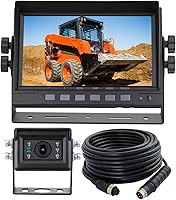
The AUTO-VOX kit below is a clear example of a system that saves files.
A built-in DVR writes continuously and recycles old files once storage is full. That means you always hold the most recent footage rather than the first day of a trip.
A plain reversing camera has no storage to fill because it saves nothing. Check the card type and maximum size the maker states before you rely on a system for evidence.
What should you check before you buy a recording camera?
Confirm the recorder is in the kit, not assumed. Four details decide whether a camera records in practice, and each one shows up in the product data before you pay.
- A DVR chip, a card slot or a named record function.
- Loop recording, so the card doesn't simply stop when full.
- The memory card type and size limit the maker states.
- Power that stays on long enough for the footage you want.
Skip a kit that only advertises a clear picture and wide angle. Those are viewing features, and they say nothing about storage.
A wide lens still shows a wide picture with no memory card inside.
What else does a recording kit bring to the job?
Storage is only one part of a five-minute install. The AUTO-VOX system pairs its DVR monitor with a magnetic camera that mounts in about a minute with no drilling or tools.
The base has a soft rubber wrap that protects paint, and a metal plate covers non-magnetic surfaces like wood or aluminum.
A dual-antenna setup keeps the signal stable across a long trailer, and the camera carries an IP69K rating for temperatures from -4°F to 149°F. That helps a recording kit keep filming in rain, dust and cold mornings when a cheaper setup might quit.
A carrying case is included for storing the camera between trips.
How does loop recording work on a backup camera?
It writes short clips in order and replaces the oldest one when the card is full. You end up with a rolling window of recent footage instead of a growing archive.
On a long drive, the first clips of the day can disappear before you reach your destination.
The AUTO-VOX system does exactly this and overwrites old files automatically. The window depends on card size and clip length, so a bigger card keeps more history.
If you need to keep a specific clip, pull the card and copy the file before the loop reaches it. A system that saves video without loop recording would stop when full, and many drivers never notice until they need a clip that isn't there.
Do wireless backup cameras record?
Wireless describes how the picture travels, not whether it's saved. A wireless camera sends video to the monitor over a radio link, and the monitor's DVR, if it has one, writes the file.
The AUTO-VOX camera is wireless and records, which shows the two features are independent.
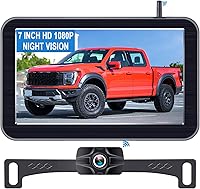
The Pemacom kit below is also wireless, and its monitor lists dual video channels rather than a recorder.
Signal range matters as much as storage here. A weak link drops frames, and dropped frames leave gaps in whatever the monitor tries to save.
The Pemacom kit uses frequency hopping on 2.4GHz for stability across its 33 foot range. For a pickup, our roundup of the best backup camera for pickup truck covers kits that suit a longer bed.
Can a backup camera record while you're parked?
Rarely, and only with power that outlasts the ignition. A camera that runs from the cigarette lighter stops when the outlet loses power.
A battery-powered camera can keep watching, but only within its stated runtime.
The AUTO-VOX camera pairs a solar panel with a rechargeable battery for up to 20 hours of continuous use. That figure describes running time, not overnight parking coverage on its own.
An auto sleep mode with three working-time settings (120s, 240s, Never) also changes how long it stays awake. Plan parking coverage around those settings rather than assuming a full night of footage.
A hit-and-run in a lot needs a camera that stays powered long after you walk away.
A big battery helps here too. The Pemacom camera comes with a 15,000mAh lithium-ion battery, a 5W solar panel and a Type-C charger, and a full 5 hour charge is rated for up to 24 hours of use.
That gives a parked kit more room to run, but it still ends when the charge does. Neither kit is a parking monitor by default, so match the runtime to how long you actually leave the vehicle.
What about a wired camera and the cable that feeds it?
A wired camera records when the monitor or head unit has a recorder. The cable carries the video signal and, on some kits, a trigger wire that tells the screen to switch to the reversing view.
The GreenYi cable below extends that run for a longer vehicle.
It's a connection part, not a recorder, so it never adds storage on its own. Its oxygen-free copper core and double shielding keep the signal stable over distance, and the maker rates the run past 100 feet.
That matters on a long trailer, where a thin unshielded cable lets interference creep into the picture. If you route a cable to a head unit that has its own recorder, the camera's footage can land there.
Check that the head unit saves video and has a card slot before counting on it. Our roundup of the best backup camera for box truck covers long runs and larger vehicles where cable length matters most.
Do backup cameras record audio?
Some do, and many don't. A camera with a built-in microphone can capture sound along with the picture, while a plain reversing camera usually carries video only.
The AUTO-VOX system records video, and its published features focus on the picture.
Treat audio as an optional extra you confirm for the exact kit you buy. Sound can be useful for a trailer hitch or a parking scrape.
It also captures conversations in the cab, so think about who else rides with you before you leave a recorder running.
Is recorded backup camera footage useful as evidence?
It can be, if the clip survives the loop and shows the moment clearly. A rear-facing view helps with a parking scrape, a rear-end hit or a trailer mishap.
Pull the card soon after an incident, because continuous recording will overwrite the file.
The camera's angle limits what it proves. A reversing camera looks down and back, so it may miss a side swipe.
A wide 170-degree lens covers more of the rear scene. For a family SUV, see the best backup camera for SUV for kits sized to that body.
Keep the card in a safe place and copy the file before the next drive.
So, do backup cameras record?
They do when the kit includes a recorder, and they don't when it's a live-view-only setup. Decide what you need first: a clear reversing picture, saved footage, or both.
Then match the kit to that answer.
A system with a DVR and loop recording gives you video without extra gear. The AUTO-VOX kit is the clear pick for most drivers who want saved footage and a reversing view in one system.
The Pemacom kit suits drivers who want a sharp wireless rear view without a recorder. Pick the GreenYi cable when you're extending a wired run to a monitor or head unit that already saves video.
For any of these, read the how do backup cameras work guide to plan the install before you order.
Frequently asked questions
How much footage fits on a memory card?
It depends on card size and video settings. Loop recording overwrites the oldest clips once the card is full, so a larger card simply keeps more history before the first clips are recycled.
Check the camera's stated card limit before buying.
Does a recording backup camera replace a dash cam?
No. A rear camera faces backward for reversing and its DVR usually covers that view only.
A dash cam points forward through the windshield and keeps its own files, so many drivers run both.
Can I add recording to a camera I already own?
Only if the monitor has a card slot and a record function. A plain reversing kit with no DVR and no slot cannot save video, and adding a cable or a second screen won't change that.