Why Is My Backup Camera Dark?
Your backup camera is dark because too little light reaches the sensor or too little signal reaches the screen. A dirty or fogged lens, weak reverse lighting, a low screen brightness setting and a poor video connection cover most cases.
On this page (8 sections)
- Why is my backup camera dark at night?
- Is the lens dirty or covered?
- Is the screen brightness or contrast set too low?
- Is the camera getting enough power?
- Can a bad video cable make the picture dark?
- Why does the camera work some days and stay dark on others?
- When is it time to replace the camera?
- What should you check first?
Your backup camera is dark because too little light reaches the image sensor or too little signal reaches the screen. A dirty or fogged lens, weak reverse lighting, a low brightness setting and a poor video connection cover most cases.
Work through these before you buy anything, because the fix is often cleaning or a settings change rather than a new camera.
Why is my backup camera dark at night?
At night, the camera depends on your reversing lights and on its own low-light sensor. If either is weak, the picture goes dark even though the camera works fine in daylight.
A burned-out or dim reverse bulb is the first thing to check. Walk behind the vehicle while someone holds the brake and reverse in gear, and see how much light actually lands on the plate area.
A camera mounted low on the bumper can also sit in its own shadow, so raising the angle by a few degrees often brightens the scene.
The mount point matters as much as the bulb. A camera tucked under a deep bumper lip or behind a plate frame catches less of the reverse light than one fitted where the light falls directly.
Try loosening the bracket and tilting the lens up and down while the screen is live, and watch which angle gives the brightest usable picture.
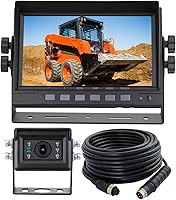
Cameras without night vision need light to work. A camera with infrared LEDs, like the FEISIKE system, adds its own invisible light for the area behind the plate, so you can see obstacles and pedestrians when the surroundings are dark.
Its infrared light is weak enough that it produces no visible glow or glare.
If the camera only goes dark in rain or snow, the problem is more likely a wet or dirty lens than the lighting.
Is the lens dirty or covered?
A lens with a film of road grime, salt or water droplets looks dark long before it looks broken. The camera only sees what passes through that glass.
Wipe the lens with a soft cloth and a little water, then dry it. Don't scrub with a dry paper towel or a fingernail, because a scratched lens scatters light and stays dim.
On a truck or a van, road spray reaches the bumper constantly, so a quick wipe before a trip is normal upkeep.
Check the mount too. A license plate frame, a bracket or a mud flap can shade the lens.
Look at the camera from the driver's seat angle and make sure nothing blocks its view. Fog inside the housing is a different case and points to a seal problem.
If cleaning clears the haze but the picture stays soft or cloudy, the lens or seal has failed. Our guide to why is my backup camera blurry or foggy covers moisture and focus problems in more detail.
Is the screen brightness or contrast set too low?
A bright camera picture can look dark on a dim monitor. Check the display settings before you climb under the bumper.
Open the monitor menu and raise brightness first, then contrast. On the FEISIKE 7 inch screen, brightness, contrast and saturation are all adjustable, and its IPS panel has anti-glare properties for bright sunlight.
A screen left at a low setting from a previous owner or a night driving profile will make every camera look weak.
Also check the angle. A monitor tilted away from your eyes loses brightness fast.
Sit in the driver's seat and tilt the screen until it faces you square, then compare day and night.
Glare is the other half of this. A glossy screen in afternoon sun can wash out so badly that a good image reads as dark.
A hood or a matte film helps, and a screen with anti-glare properties is the longer fix.
Is the camera getting enough power?
A camera that receives low voltage produces a weak, dark image. The usual culprits are a loose ground, a worn splice into the reversing light and a power feed shared with too many loads.
Check the ground wire at the camera end first. A ground that bites into paint or a rusty bolt adds resistance and dims the output.
Move it to clean bare metal and tighten it.
If the camera taps the reversing light, test the light itself. A bulb on its way out can still glow while the voltage sags when the camera draws current.
Also check the cigarette-lighter plug on plug-and-play kits; a loose fit in the socket causes voltage drops that show up as a dim or flickering picture.
The Pixelman camera is built around a 1/2.7 inch sensor, which the brand says gives more brightness and color saturation than the 1/4 inch chip used in ordinary cameras. Brighter output starts with a sensor that can use the light it gets.
Matching the camera signal to the screen
A dark picture can also come from a mismatch, not a failure. The Pixelman PMD2A-S ships set to HD (720P) output and can be switched to AHD (1080P) according to its manual.
That switch only helps if the screen accepts an AHD signal. On a screen that does, the AHD setting delivers the full 1080P image the chip can produce.
On a screen that does not, the picture may stay soft or drop out no matter how bright the scene is. Before blaming the camera, confirm what your monitor accepts and set the camera to match.
Can a bad video cable make the picture dark?
Yes. A weak or damaged video signal reaches the monitor as a dim, washed-out or grainy image.
The cable carries the picture, so any loss along the run shows up on screen.
Look for a crushed or kinked cable where it passes through a tailgate or door gap. Repeated bending breaks the inner conductor while the outer jacket still looks fine.
Pull both ends and check the RCA plugs for corrosion or a loose fit.
Keep the video cable away from power wires. Running it alongside a reverse light feed or an amplifier cable picks up interference that dulls the picture.
A double-shielded cable reduces that.
If the run is long, a quality extension helps. The EWAY 20 ft RCA cable uses copper braid and aluminum foil shielding to cut interference, and its built-in trigger wire can switch the monitor to the camera view when you select reverse.
It also includes a female-to-female coupler for joining two male cables.
Why does the camera work some days and stay dark on others?
Intermittent darkness points to a connection that moves, not to the camera sensor. A ground that loses contact over bumps, a plug that works loose or a splice that corrodes will cut the image at random.
Wiggle each connector while watching the screen. Start at the monitor, then the RCA joint behind the dash, then the camera end.
Re-seat every plug and check the ground screw.
Heat matters too. A camera that works in the morning and fades after a hot afternoon may have a failing seal or a power feed that sags as the wiring warms.
Our guide to why does my backup camera only work sometimes walks through the intermittent faults in order.
When is it time to replace the camera?
Replace the camera when the picture stays dark in full daylight after cleaning, settings and wiring checks. That pattern means the sensor or the internal electronics have failed.
Water damage is the usual cause behind a slow fade. A housing that lets moisture in corrodes the board, and the image dims before it dies.
The Pixelman PMD2A-S uses a sturdy alloy housing sealed with Nano waterproof glue and carries an IP69 rating. The FEISIKE camera is rated IP68 for rain and temperature swings.
Test the old camera in bright sun with the engine running. If the image is still black, or shows only faint shapes, the camera is the problem.
A camera that shows a bright image in daylight but goes black at night only needs more light or night vision.
The FEISIKE kit is the direct replacement when you want a screen and camera in one box. Its 1080P 7 inch monitor, 150 degree wide angle and adjustable guide lines make reversing easier in tight spaces, and the guide lines can be flipped to match your vehicle.
Pick a backup camera for a pickup truck if you drive a bed-heavy truck and need a longer cable run.
For a taller vehicle, a backup camera for a box truck with a wide field of view suits the longer blind spot. Before you order, measure the distance from the monitor to the camera so the cable reaches.
What should you check first?
Start with the cheap checks: clean the lens, raise screen brightness and test in daylight. If the picture is still dark, test the ground and the RCA plugs.
Only after those steps should you consider a new camera or a longer cable.
Most dark backup camera pictures come down to light or signal. Fix the lens and the screen settings first, then the wiring.
A camera upgrade makes sense when the sensor itself has failed or when you drive at night without enough reverse lighting.
Frequently asked questions
Does a darker image always mean the camera is broken?
No. A dim picture usually comes from light or settings, so clean the lens, raise the screen brightness and test the camera in daylight first.
A camera that still shows black or static after those steps is more likely to have a hardware fault.
Can the monitor make a working camera look dark?
Yes. A low brightness setting, a steep viewing angle or glare on the screen can make a bright camera image look dim.
Adjust brightness and contrast, then tilt the monitor so your eyes sit square to it before blaming the camera.
Why does the picture look dark only when reversing at night?
Reversing lights are the main light source for most cameras at night. If a reverse bulb is out, the camera sees almost nothing, so check the bulbs and the reverse light wiring before adding a night-vision camera.
Does a longer video cable make the image darker?
It can weaken the signal when the cable is long, thin or poorly shielded. Keep the video run short where you can, keep it away from power wires, and use a quality extension so the signal arrives at the screen at full strength.
Will a new camera with night vision fix a dark picture?
It fixes a light problem, not a wiring problem. Infrared night vision helps when the scene behind the vehicle is unlit, but if the fault is a dim screen, a bad cable or a covered lens, a new camera will look just as dark.