Do Wireless Backup Cameras Work Well?
Yes, wireless backup cameras work well when the camera and monitor have a clear, stable signal and the camera has reliable power. Wireless describes the video connection, so some systems still need a power wire.
On this page (9 sections)
- How do wireless backup cameras work?
- Does wireless mean there are no wires?
- What affects wireless camera signal?
- How does a wireless backup camera get power?
- Are wireless backup cameras reliable on trailers and RVs?
- What should you check before choosing one?
- How can you tell if a wireless camera is working properly?
- When should you choose wired instead?
- Do wireless backup cameras work well for you?
Yes, wireless backup cameras work well when the camera and monitor have a stable signal and the camera has reliable power. “Wireless” usually describes how video travels to the screen; it doesn't always mean the camera needs no wiring.
That distinction matters when choosing a setup. A camera powered by a reverse light still needs a power connection, while a battery or solar model can reduce wiring at the camera.
How do wireless backup cameras work?
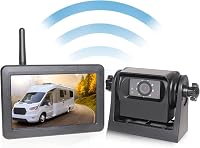
A wireless backup camera sends video from a rear camera to a monitor through a radio signal. The camera and screen still need power, and some systems use a wire to turn the camera on when you shift into reverse.
The camera captures the view behind the vehicle, then a transmitter sends it to a receiver connected to the display. The receiver may be built into the monitor.
Distance, metal surfaces, vehicle layout, and other radio signals can affect the connection.
Wireless systems vary in how they get power. A camera can connect to a reverse light, running light, or another power source, while a monitor can plug into a vehicle outlet.
For battery and solar options, see how wireless backup cameras get power.
Does wireless mean there are no wires?
No. Wireless usually means the video connection is wireless, not that every part is wire-free.
A powered camera still needs a connection to a power source unless it uses a rechargeable battery or solar charging.
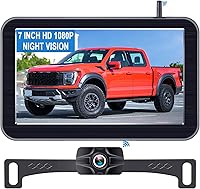
For example, the LeeKooLuu camera connects to a power source such as a reverse light, running light, or another supply. Its monitor and camera connect wirelessly, and the system comes pre-paired.
Before buying, check whether the power method suits your vehicle and how you want the camera to behave. A reverse-light connection can make the camera turn on with reverse, while a different power source may let it stay on longer.
What affects wireless camera signal?
Distance and obstructions are the main practical factors to check. A system's stated range is a guide, but your vehicle's body, trailer, and camera position can change how well the signal reaches the monitor.
Metal panels and equipment between the camera and monitor may weaken a signal. Antennas, when included, need room and a clear position; avoid burying them behind dense trim or mounting them against other electronics.
The Pemacom system supports 2.4 GHz transmission and lists a range of up to 33 ft. Its frequency-hopping receiver is designed to reduce interference, but placement still matters.
For a longer vehicle or trailer, compare the full distance and layout with the system's stated range. The best wireless backup cameras for towing a trailer guide can help you compare setups intended for towing.
Can nearby electronics interfere with a wireless backup camera?
They can affect reception, so check the picture in the actual mounting positions. A signal that works in an open area may behave differently when the camera sits behind a vehicle body or trailer.
If the image drops or freezes, first check that the camera and monitor have power. Then reposition antennas or the monitor if possible, and test whether moving either part improves the view.
How does a wireless backup camera get power?
The camera needs its own power source even when it sends video wirelessly. Common options include vehicle wiring, a rechargeable battery, or a solar panel paired with a battery.
A wired power connection can keep a camera ready when the vehicle is on, but installation takes more planning. Battery and solar setups can be easier to move or mount, though you need to consider charging, sunlight, and how often the system is used.
The AUTO-VOX camera combines a solar panel with a rechargeable battery and has an auto sleep mode. AUTO-VOX states that it can run for up to 20 hours, with actual charging needs depending on use and available sunlight.
A solar panel can help maintain charge, but don't assume it will eliminate charging in every setting. A shaded parking spot or frequent use may change how much supplemental charging is needed.
Are wireless backup cameras reliable on trailers and RVs?
They can be reliable when the signal range, power setup, and mounting position fit the vehicle and trailer together. Test with the trailer attached, since the final distance and obstructions differ from a parked vehicle without a trailer.
A long trailer can place the camera far from the monitor. The tow vehicle and trailer may also block the signal, so choose a system with a stated range that gives you room beyond the measured distance.
The AUTO-VOX system states a transmission range of up to 524 ft and includes a dual-antenna design. That range may suit longer towing setups, but the real connection still depends on placement and surroundings.
For a magnetic setup without drilling, compare the options in best magnetic backup cameras. If you want a car-focused setup, how to pick a wireless backup camera for your car covers fit and installation choices.
What should you check before choosing one?
Match the camera's power method, stated range, and mounting style to your vehicle. These details determine whether the system is practical after installation.
- Power: Check whether the camera uses vehicle wiring, a battery, or solar charging, and how the monitor gets power.
- Distance: Measure from the camera's planned position to the monitor, including any trailer.
- Mounting: Confirm that a magnetic or surface mount fits the material and shape where you plan to attach it.
- Display: Check screen size, mounting location, and whether you need one camera view or more than one.
- Setup: Find out whether the camera and monitor come paired and whether you need to connect camera power yourself.
If you prefer a temporary magnetic camera, check the surface and mounting instructions before attaching it. See how to mount a backup camera so it sees the right spot for placement guidance.
How can you tell if a wireless camera is working properly?
Test the camera while parked before depending on it for reversing. Confirm that the monitor turns on, the image stays visible, and the view covers the area you need.
Check the picture with the vehicle in its intended setup. If you tow, attach the trailer and test again; if the camera uses a reverse-light connection, confirm that the view appears when reverse is selected.
A picture that cuts out may point to weak power, a loose connection, or a signal problem. For a step-by-step check, use how to test a backup camera before and after install.
A backup camera helps you see behind the vehicle, but it doesn't replace mirrors or a direct check of your surroundings. Keep your attention on the full area around the vehicle while reversing.
When should you choose wired instead?
Choose a wired system if you want a direct video connection and can route a cable through the vehicle. It may take more installation work, especially on a trailer, but it avoids relying on a wireless video signal.
Wireless can be a practical fit when cable routing is difficult or you want a removable camera. Wired may suit a permanent installation where you can run the cable and prefer not to manage a camera battery.
For a permanent vehicle setup, compare the trade-offs in best wired backup cameras with a monitor. Consider camera power separately, because a wired video system may still need its own power connections.
Do wireless backup cameras work well for you?
Choose wireless if easy placement or avoiding a long video cable matters, and your camera-to-monitor distance fits the system. Choose a battery or solar model when reducing camera wiring is a priority and you can keep it charged.
For a camera powered from the vehicle, the LeeKooLuu option connects to a power source while sending video wirelessly. For a magnetic rechargeable setup, Pemacom offers a stated 33 ft range, while AUTO-VOX pairs solar charging with a longer stated range for towing use.
Check the installation method and power needs before deciding. If you still need help narrowing down a system, compare the best backup camera systems for any car, truck or RV.
Frequently asked questions
Do wireless backup cameras work well?
Yes, wireless backup cameras can work well for reversing and parking when the signal reaches the monitor and both parts have power. Range, obstacles, interference, and camera placement affect the picture, so check the system's stated range and test it in your vehicle before relying on it.
Do wireless backup cameras need to be wired?
Some wireless cameras still need a wire for power. The camera sends video wirelessly, while the camera and monitor each need a power source; battery or solar models reduce wiring at the camera but need charging or sunlight.
Can a wireless backup camera lose signal?
Yes, a wireless camera can have a weak or interrupted signal if distance, metal, vehicle structure, or nearby electronics interfere with transmission. Place the monitor where its receiver can connect, keep antennas clear when included, and check the view during a real installation.
Are wireless backup cameras good for trailers?
They can suit trailers when the system's transmission range covers the distance from camera to monitor and the camera has dependable power. Compare the stated range with your full towing setup, including the tow vehicle, trailer, and mounting position, then test before a trip.