Why Is My Backup Camera Blurry or Foggy?
A backup camera often looks blurry because the lens is dirty, wet, scratched, or fogged, though a loose connection or display setting can also soften the picture. Clean the lens gently, check the screen and wiring, then look for moisture inside the camera.
On this page (7 sections)
- Why is my backup camera blurry or foggy?
- How do you clean a backup camera lens safely?
- What should you check if cleaning doesn't help?
- When does a blurry image point to a signal or display problem?
- Which replacement camera features may help with a persistently unclear view?
- Is a blurry backup camera safe to use?
- What is the quickest way to narrow down the cause?
A backup camera often looks blurry because the lens is dirty, wet, scratched, or fogged. A loose connection or display setting can also soften the picture, so start with a gentle lens cleaning and then check the screen and wiring.
If the haze seems to sit inside the lens, don't pry open the camera housing. A damaged seal or scratched lens may need repair or replacement.
Why is my backup camera blurry or foggy?
A backup camera image can look blurry when the lens is coated with dirt, water, road film, or condensation. The screen, cable, or camera itself may also be causing a soft picture.
Start with the easiest checks: wipe the lens with a soft, clean cloth, then look at the screen for smudges or glare. If the picture stays unclear, note whether it changes with weather, lighting, or vehicle movement.
Can dirt or water on the lens blur the image?
Yes. Dust, road grime, salt, and water droplets scatter light and can make the view look hazy, especially at night when headlights shine toward the camera.
Park safely, switch off the camera system if its instructions require it, and clean the exterior lens gently. Don't scrape off dried mud or use a rough towel, since grit can scratch the lens.
Can condensation form inside the camera?
Yes. Condensation can appear when a camera or lens gets damp and then cools.
Haze that sits behind the outer lens, or returns soon after cleaning, can point to moisture inside the housing.
Dry the exterior and check for cracks, loose seals, or a camera knocked out of place. Avoid heating the camera with a heat gun or directing high-pressure water at it; follow the camera maker's care instructions.
How do you clean a backup camera lens safely?
Use a clean microfiber cloth and a little water to remove loose dirt, then dry the lens with a separate part of the cloth. Check your vehicle and camera instructions before using any cleaner.
Don't use paper towels, abrasive pads, solvents, or a blade unless the camera maker specifically approves them. These can scratch or damage the lens coating.
If mud is stuck on the camera, soften it with water before wiping. Keep cleaning liquid away from seams, connectors, and nearby wiring.
What should you check if cleaning doesn't help?
If the lens is clean, check the display surface, brightness, image settings, and wiring. Change one thing at a time so you can tell which check affects the picture.
Wipe the monitor or dashboard screen with a cloth safe for that display. Reduce glare or adjust brightness and contrast using the screen's controls; a bright screen in a dark area can make a usable image seem washed out.
Next, look for a loose connector, pinched cable, or visible damage along the accessible wiring. Don't pull on wires or probe electrical connections unless you know how to do so safely.
Our guide to testing a backup camera before and after installation explains checks for the camera feed and connections. If the image also cuts out or goes black, see what to check when a backup camera stops working.
Could the camera's angle make the image seem blurry?
A poorly aimed camera can make the view less useful, but it usually won't make the whole image optically blurry. Check whether the camera has shifted, is pointed at the bumper, or is catching glare from a nearby surface.
If the image is sharp in one area but not where you need it, adjust the mount according to its instructions. Our guide on mounting a backup camera to see the right spot covers placement and view angle.
When does a blurry image point to a signal or display problem?
A blurry, flickering, or distorted picture can point to a cable, connector, power, or signal mismatch. If possible, compare the image on another compatible display or check the system's format and connection settings.
For wired cameras, inspect accessible cable connections and look for pinched or frayed sections. For wireless systems, check the camera and monitor power, distance, and any placement limits in the instructions.
Some systems use different video formats. If the camera and monitor don't support the same signal type, the picture may not display correctly; see AHD vs CVBS backup camera signals for a format overview.
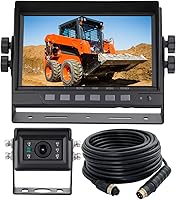
The ATPTK wired system pairs a 1080P AHD camera with a 7-inch monitor, which may suit someone replacing a matched camera-and-screen setup.
Check that any replacement camera matches your monitor's signal format and connectors before choosing it. A higher resolution alone won't fix a mismatch.
Which replacement camera features may help with a persistently unclear view?
If cleaning and connection checks don't help, consider replacing a camera with a damaged lens, persistent internal moisture, or a failing image feed. Choose a model that fits your mounting position, wiring, display, and vehicle.
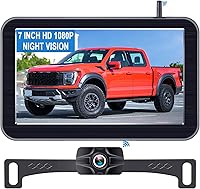
For a truck or RV setup, the LeeKooLuu system pairs a 1440P camera with a 7.2-inch monitor and a wired connection.
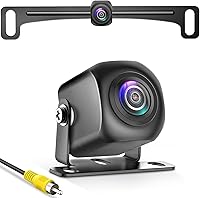
The Natika camera has a sealed, glue-filled housing and is described as IP69K waterproof. It may fit a replacement need where the existing camera has water intrusion, but check connector and screen compatibility first.
A camera swap may not help if the screen or cable is the source of the blur. Confirm the faulty part and match the new camera's signal and connector to the rest of the system.
Is a blurry backup camera safe to use?
A blurry image can hide a person, obstacle, or distance cue, so don't rely on it as your only view while reversing. Clean or repair the camera, and use mirrors and a direct visual check when safe.
Reverse slowly and stop if you can't see the area behind the vehicle clearly. A backup camera supplements careful driving; it does not replace checking your surroundings.
What is the quickest way to narrow down the cause?
For a blurry backup camera, clean the lens first, then check the screen, settings, and visible connections. If fog remains inside the lens or the image stays unclear, inspect the camera and system for damage or compatibility problems.
Pick a cleaning step if the lens is dirty, a wiring check if the image flickers or cuts out, and a camera replacement if moisture or lens damage persists. For a broader repair path, browse the camera setup and fixes guide.
Frequently asked questions
Why does my backup camera look foggy?
A backup camera may look foggy when condensation, dirt, road film, or water covers the lens. Wipe the outside with a soft, damp cloth and dry it.
If haze remains behind the lens or returns quickly, moisture may have entered the camera housing, and the camera may need inspection or replacement.
Can I use glass cleaner on a backup camera lens?
Check the vehicle and camera instructions before using a cleaner. Start with water and a clean, soft microfiber cloth, since grit or a rough towel can scratch the lens.
Avoid spraying liquid into seams or onto nearby electrical parts, and don't use abrasive cleaners unless the manufacturer approves them.
Why is my backup camera blurry at night?
At night, a dirty lens, low light, glare, or a weak display signal can make the picture look blurry. Clean the lens and compare the image in a different area with less glare.
If the camera has night vision, check its instructions and inspect the wiring if the image stays unclear.
Does a blurry backup camera need to be replaced?
Not always. Clean the lens, check the display settings, and inspect accessible wiring and connectors first.
If the lens is scratched, moisture is trapped inside, or the image remains blurry after those checks, the camera or its cable may need repair or replacement.