Why Is My Backup Camera Not Working? What to Check
Check power and the reverse signal first. Then inspect the camera and display connections, confirm the monitor is on the right input, and look for a weak wireless link or damaged cable.
On this page (7 sections)
- Why is my backup camera not working when I shift into reverse?
- What should I check if the screen is black?
- Why does the backup camera work sometimes?
- How do I check the reverse trigger and wiring?
- Can water, dirt, or a blurry lens make the camera seem broken?
- When should I stop troubleshooting?
- What should I check first if my backup camera is not working?
If your backup camera is not working, check its power, reverse signal, and connections first. Then confirm the monitor is on the correct input and, for a wireless camera, check the signal path and antenna.
Start with the symptom: a blank screen, a camera that never turns on, or an image that cuts in and out can point to different problems. Make one change at a time so you can see what fixes it.
Why is my backup camera not working when I shift into reverse?
A camera that stays off in reverse may not be getting power or a reverse trigger. Check that the vehicle is fully in reverse, the monitor is switched on, and the camera has a secure power connection.
Many systems use power from the reverse-light circuit to turn on the camera, while others can use running lights or another power source. A separate trigger wire may tell an aftermarket radio or monitor to display the image.
Check the camera and head-unit instructions before changing any wiring.
If the system was recently installed, review how to hook up a backup camera to reverse lights. Incorrect connections can prevent the reverse signal from reaching the camera or display.
For a wireless kit, “wireless” usually describes the image connection between camera and monitor. The camera and monitor may still need their own power connections.
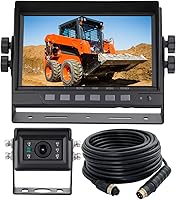
The LeeKooLuu system, for example, has a wireless camera-to-monitor connection, while its camera needs a power source.
Check the monitor's power plug and display before moving on. If the monitor is dark, troubleshoot its power first; if it lights up but shows no image, inspect the camera power and video signal next.
What should I check if the screen is black?
A black screen can mean the monitor has no power, the wrong input is selected, or the camera signal is missing. First check whether the display itself turns on and shows menus or other screen information.
If the display is completely dark, check its power connection and any applicable vehicle fuse using the vehicle manual. Don't replace a fuse with a different rating.
If a replacement fuse blows again, stop and have the circuit inspected.
If the screen turns on but shows no camera image, select the correct camera channel or input. Then check the camera's power and any wired video connection, including plugs that may have loosened during installation.
For a wired camera connected to an aftermarket radio, the reverse trigger may be separate from the video cable. The EWAY 20-foot cable has an RCA video connection and a trigger wire for compatible head units; its trigger wire only applies when the head unit has a matching trigger connection.
If a connection feels loose, inspect for a bent pin, corrosion, moisture, or visible cable damage. Disconnect power before reseating or inspecting wiring, and follow the vehicle and camera instructions.
Why does the backup camera work sometimes?
Intermittent video often points to a loose connection, unstable power, or a wireless signal problem. Pay attention to when the image cuts out, such as after a bump, at a certain distance, or when other electrical equipment is on.
For a wired system, check the camera's power connection and the video cable from the camera to the display. Secure loose plugs and look along the cable for pinches or cuts, especially where it passes through a hatch, tailgate, or body panel.
For wireless systems, confirm that the camera and monitor antennas are attached and positioned as their manuals recommend. If you have a Furrion camera, the Eifagur dual-band replacement antennas are designed for Furrion backup cameras and use RP-SMA male connectors, so check compatibility before choosing them.
A weak image or signal dropout can also come from distance or obstacles between the camera and monitor. For more on the limits of a wireless connection, see whether wireless backup cameras work well.
How do I check the reverse trigger and wiring?
Follow the system's wiring diagram and check each connection from power source to camera and display. Don't guess at wire colors; vehicles and camera kits can use different wiring.
If the camera gets power from the reverse lights, check whether those lights come on when you shift into reverse. If they don't, the issue may be in the vehicle circuit rather than the camera.
Use the vehicle manual and a qualified technician when you aren't sure how to check the circuit safely.
If the reverse lights work but the monitor doesn't switch to the camera, inspect the trigger connection between the vehicle and display. Aftermarket radios may have a reverse input that needs its own connection.
The EWAY cable's trigger wire is for a head unit with a trigger wire. EWAY also describes connecting the cable's red wire to reverse-light power when the monitor lacks a trigger wire, but verify that wiring method against your equipment's instructions before connecting it.
For an orderly check, test a backup camera before and after installation one connection at a time. That can help distinguish a camera fault from a power, trigger, cable, or display issue.
Can water, dirt, or a blurry lens make the camera seem broken?
A dirty lens can make an operating camera look unusable, while moisture or damage may affect the image. Wipe the lens gently with a soft, clean cloth and check for dirt, water droplets, or an obstruction.
Look at the camera housing and its cable entry for visible cracks or loose parts. Don't open a sealed camera or apply heat to dry it; follow the maker's care instructions.
If the screen works but the picture is hazy, distorted, or foggy, use our guide to a blurry or foggy backup camera to narrow down the cause. A clear image that cuts out needs a different check than a consistently blurry one.
When should I stop troubleshooting?
Stop if you find damaged wiring, repeated blown fuses, or a problem that needs work on a vehicle circuit you can't safely identify. Have a qualified installer or technician inspect the system.
You can usually check visible connections, monitor settings, and lens condition without altering wiring. Before testing or reconnecting powered components, follow the vehicle and camera manuals.
What should I check first if my backup camera is not working?
If your backup camera is not working, start with power and the reverse signal, then check the display input and camera connections. For wireless systems, inspect antennas and signal placement; for wired systems, check the RCA cable and trigger connection.
Choose the next step by symptom: a dark monitor points to display power, a lit screen without video points to the camera signal, and dropouts call for connection or wireless checks. If the basic checks don't solve it, use the camera setup and fixes guide or ask a qualified technician to inspect the wiring.
Frequently asked questions
Why does my backup camera screen go black?
A black screen often points to lost power, a loose connection, the wrong display input, or a missing reverse signal. Check whether the monitor turns on, then inspect the camera's power connection and the trigger wire or vehicle reverse-light circuit.
For a wireless system, check its antenna and signal path.
Why does my backup camera work sometimes?
Intermittent operation can come from a loose power or video connection, a reverse-light circuit that doesn't trigger consistently, or a wireless signal that drops out. Note whether the problem changes with vibration, weather, or distance, then inspect the matching connections and consult the camera and vehicle manuals.
Can a blown fuse stop a backup camera from working?
Yes. If the camera or monitor uses a fused power circuit, a blown fuse can interrupt power.
Check the vehicle manual for the correct circuit and fuse location, and replace a fuse only with the specified type and rating.
If it blows again, have the circuit checked.
How do I know if my backup camera is broken?
A camera may be faulty if it has correct power and connections but still shows no image, and the display and signal path work with a known compatible camera. Check the manual and test one part at a time before replacing anything, since a bad trigger wire or monitor can cause similar symptoms.