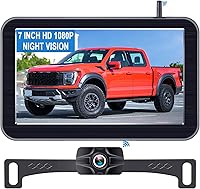
How to Pick a Wireless Backup Camera for Your Car
Choose a wireless backup camera for your car by matching its power and mounting needs to your vehicle. Check how the camera gets power, where it can mount, whether the screen fits your dash and what the maker says about range and weather.
On this page (10 sections)
- How to Pick a Wireless Backup Camera for Your Car
- What should you check before choosing a wireless backup camera for a car?
- Does wireless mean the camera needs no wiring?
- Which camera power source suits your car?
- How do mounting and monitor size affect fit?
- What signal range and extra views do you need?
- Which wireless backup camera options fit different cars?
- How do you narrow the choice?
- Does a wireless camera suit your installation plan?
- Sources
How to Pick a Wireless Backup Camera for Your Car
Choose a wireless backup camera for your car by checking how the camera gets power, where it mounts and whether the monitor fits your dash. Wireless systems send video without a long cable through the vehicle, but the camera and screen still need power.
Start by deciding whether you want a fixed installation or a camera you can move between vehicles. Then compare the monitor size, mounting method, power source and the maker's stated signal range.
What should you check before choosing a wireless backup camera for a car?
Check camera power, monitor power, mounting, screen size and signal range before comparing extras. These determine whether the system fits your car and how much setup it needs.
A wireless connection does not mean the camera runs without power. Some systems connect the camera to a vehicle power source; others use a rechargeable battery.
The monitor also needs a power connection.
Make sure you understand where each component will go. A camera intended for a metal mounting surface may not suit a spot without accessible metal, and a large monitor may take up more dash space than you want.
Use this quick checklist:
| Check | What to confirm |
|---|---|
| Camera power | Vehicle connection or rechargeable battery |
| Monitor power | Where it plugs in and whether the cable reaches |
| Mounting | Magnetic or surface mount, and where it can sit |
| Screen | 5-inch or 7-inch size and a suitable viewing position |
| Signal | The maker's stated range and any conditions attached |
| Extra views | Whether the system supports a second camera |
For more options across vehicle types, see our backup camera systems guide. If you're adding a camera to a car without one, our guide on adding a backup camera to an older car covers the main fit questions.
Does wireless mean the camera needs no wiring?
No. Wireless refers to video transmission, not necessarily camera power.
A system may avoid a video cable through the cabin while still needing a connection to a vehicle power source.
For example, LeeKooLuu says its monitor and camera connect wirelessly, while the camera wire supplies power. Its setup allows the camera to connect to the reverse lights, running lights or another power source, and the monitor connects to vehicle power.
Battery-powered cameras reduce the need for a camera power wire at the mounting point. They add charging to your routine, and sunlight-assisted charging may not replace charging by cable.
Before you choose, trace the practical route for the monitor's power lead and decide whether you can provide camera power at the rear. If wiring the camera is a concern, compare battery-powered options and read how wireless backup cameras get power.
Which camera power source suits your car?
Choose vehicle power for a fixed setup or a rechargeable battery if you want to avoid routing power to the camera. Solar assistance can help replenish a battery outdoors, but it does not remove the need to plan for charging.
The four options here use different approaches:
| System | Camera power details |
|---|---|
| Pemacom | 15,000mAh rechargeable battery, 5W solar panel and USB-C charger |
| LeeKooLuu | Connects to reverse lights, running lights or another power source |
| AUTO-VOX | Solar-assisted battery; USB-C is the main charging method |
| Xrizuo | Approximately 10,000mAh rechargeable battery, 5W solar panel and USB-C charger |
Pemacom says a full 5-hour charge can provide up to 24 hours of use. That figure is a maker claim, so consider your own driving pattern and charging access when deciding whether a battery system suits you.
The AUTO-VOX solar panel is designed to replenish part of the battery while the vehicle is outdoors. Its maker says USB-C remains the main charging method during cloudy weather, winter or heavier use.
How often will you need to charge it?
Think about where the car is parked and how often you drive. A car kept outdoors may get some solar assistance from a camera designed for it, while a vehicle parked inside or used heavily may need more frequent cable charging.
Also check whether the camera sleeps when the monitor is off. Pemacom and Xrizuo describe an automatic sleep mode tied to the monitor being turned off, which is intended to reduce battery use.
How do mounting and monitor size affect fit?
Choose a camera mount that suits the intended spot and a monitor that fits your dash without blocking your view. Magnetic systems need a suitable metal surface, while surface-mounted cameras need a place for their bracket.
Pemacom and Xrizuo use magnetic camera mounts. Both describe a rubber-coated base intended to protect paint, and both include a 5W solar panel.
Check the mounting instructions and the car's surfaces before relying on a magnetic mount.
LeeKooLuu uses a surface-mounted camera and includes a 7-inch monitor with a suction-cup mount. AUTO-VOX uses a surface-mounted camera and a 5-inch monitor.
A 7-inch display can be easier to check at a glance, but it takes more space. A 5-inch display may suit a tighter dash; measure the area and make sure the screen position does not obstruct your forward view.
For placement tips, see how to mount a backup camera so it sees the right spot. If you are deciding between a removable magnetic setup and a more fixed installation, our magnetic backup camera guide covers that style.
What signal range and extra views do you need?
Compare the maker's stated range with your vehicle and where you plan to mount the camera. A stated range is not a guarantee of performance in every car, since the vehicle and surroundings can affect a wireless signal.
Pemacom gives a transmission distance of up to 33 feet. Xrizuo says its system can work across a vehicle range of up to 36 feet and gives a longer open-area figure of 320 feet.
Those figures describe different conditions, so focus on the vehicle-range figure when planning a car installation.
If you want views from more than one camera, check that the system supports an additional camera and how the screen displays channels. Pemacom and Xrizuo describe dual-channel support; LeeKooLuu supports up to 2 cameras and split-screen viewing.
A second camera can be useful if you need another view, but it adds a camera to mount and power. Choose that feature only when you have a clear use for the extra angle.
Which wireless backup camera options fit different cars?
These systems suit different setups based on power, mount and screen size. Match the product to your installation plan rather than choosing by a feature label alone.
Pemacom: magnetic mount and rechargeable power
The Pemacom combines a magnetic camera mount, rechargeable battery, solar panel and a 7-inch monitor. Its camera is listed with a 170-degree view, and it supports a second camera.
Pemacom says the battery can provide up to 24 hours of use after a full 5-hour charge. The monitor can use a cigarette-lighter adapter or USB power, giving you two stated options for powering the display.
Choose it if you want a removable magnetic camera and a larger screen. Confirm the camera can attach securely at the spot you intend to use.
LeeKooLuu: vehicle-powered camera and 7-inch monitor
The LeeKooLuu uses a camera power wire and a wireless video connection to its 7-inch monitor. Its maker says the camera can connect to reverse lights, running lights or another power source.
The system supports up to 2 cameras and split-screen viewing. Its adjustable parking lines can be set to fit the vehicle.
Choose it if you want a fixed power connection and a larger display. Plan how to route power to the camera before installation.
AUTO-VOX: compact screen with solar-assisted battery
AUTO-VOX pairs a surface-mounted camera with a 5-inch monitor and solar-assisted battery. The maker describes USB-C as the main charging method, with solar helping replenish part of the battery while the car is outdoors.
AUTO-VOX says the system uses a 1080p camera and has IP69K weather protection. Its stated field of view is 130 degrees.
Choose it if you want a compact screen and prefer a battery camera over routing power to the rear. Plan to charge by USB-C, especially when the car sees limited sun.
Xrizuo: magnetic mount with a 5-inch screen
The Xrizuo has a magnetic camera base, rechargeable battery, solar panel and 5-inch monitor. It also supports a second camera and describes a 150-degree viewing angle.
Xrizuo says the battery is approximately 10,000mAh and recommends USB-C as the primary charging source because solar-assisted charging is limited. Its stated operating temperature range is -22°F to 150°F.
Choose it if you want a smaller display and a removable magnetic camera. Check the mounting surface and plan to charge it by cable as needed.
How do you narrow the choice?
Pick Pemacom or Xrizuo for a magnetic battery camera, AUTO-VOX for a compact surface-mounted system with solar assistance, or LeeKooLuu for a camera that connects to vehicle power. The right fit depends on your mounting spot, charging habits and screen space.
Before buying, confirm the camera can mount where you need it, the monitor can sit in a safe viewing position and you have a workable power plan for both parts. If you need a fixed rear connection, review how to hook up a backup camera to reverse lights before choosing a system.
Does a wireless camera suit your installation plan?
A wireless backup camera is a good fit when you want video to reach the monitor without a long cable through the cabin. Choose based on the camera's power and mount first, then select a screen size that works in your car.
Choose a magnetic battery model if you can use its mount and accept charging. Choose a vehicle-powered camera if you prefer a fixed power connection, and measure the dash before settling on a 5-inch or 7-inch monitor.
For broader car and pickup options, browse our car and pickup cameras guide.
Sources
- National Highway Traffic Safety Administration: Rear Visibility
- AUTO-VOX support and product information
Frequently asked questions
Does a wireless backup camera need power?
Yes. Wireless describes how the camera sends video to the monitor, not how the camera runs.
A camera may use a vehicle power connection or a rechargeable battery, while the monitor also needs power.
Check both power arrangements and how often a battery model needs charging.
Will a wireless backup camera work in any car?
Not every system fits every car. Check the camera's mounting method, how it receives power, the monitor's power connection and the maker's compatible vehicle types.
Also measure the screen and confirm that you can place it without blocking your view.
Is a magnetic backup camera a good choice for a car?
A magnetic mount can suit a car if the intended mounting spot is metal and the camera base can sit securely there. Check the system's mounting instructions and remove or reposition it as needed.
A magnetic camera still needs power and a compatible monitor.
What screen size is best for a backup camera?
Choose a screen that is easy to see while leaving your forward view clear. A 5-inch monitor takes less dash space than a 7-inch one, while a larger screen may be easier to check at a glance.
Measure the mounting area before choosing.