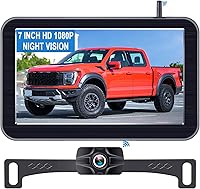
How Do Wireless Backup Cameras Get Power?
Wireless backup cameras get power from a vehicle wire, a rechargeable battery, or both a battery and solar panel. The monitor also needs power, often from a vehicle outlet or a wired connection.
On this page (7 sections)
Wireless backup cameras get power from vehicle wiring, a rechargeable battery, or a battery paired with a solar panel. The monitor also needs power, commonly from a vehicle outlet or a wired connection.
“Wireless” usually describes the video signal between camera and monitor. It doesn't mean every part runs without power cables, so check how both pieces are powered before you choose a system.
How do wireless backup cameras get power?
Most wireless backup cameras use one of three power setups: vehicle wiring, a rechargeable battery, or a battery supported by solar charging. The right option depends on whether the camera stays on one vehicle, how often you use it, and whether you can reach a power wire at its mounting spot.
A wired camera may connect to a vehicle circuit, such as reverse lights, while it sends video wirelessly to the display. A battery-powered camera avoids a power wire to the camera, but you need to recharge it.
Solar panels can add charge to a rechargeable battery when sunlight reaches the panel. They can reduce manual charging, but conditions such as shade and parking location affect solar exposure.
For the monitor, check its power connection separately. A camera's wireless video connection doesn't power the display.
Is a wireless camera powered by the reverse lights?
Some cameras use a vehicle wire connected to the reverse light circuit. This can make the camera turn on when you shift into reverse, though systems designed for an always-on rear view may use a different connection.
The wire supplies power; wireless transmission carries the picture to the display. Our guide to hooking up a backup camera to reverse lights explains the connection and what to check before wiring.
Do battery-powered cameras still need wires?
A battery-powered camera doesn't need a vehicle power wire while operating, but it still needs charging. Some models use a charging cable, while solar-equipped models may supplement the battery when parked in sunlight.
Check the battery's expected use time and how you'll recharge it. A long trip, frequent reversing, or a camera left on for continuous viewing can use power differently than occasional backing up.
Does the monitor need a power wire too?
Yes, the monitor needs its own power source. Wireless video removes the signal cable between camera and screen, but the display still needs electricity to operate.
Many kits power the monitor from a vehicle outlet or a vehicle connection. For example, the AUTO-VOX system includes a cigarette lighter adapter, while Pemacom's kit includes a USB power cord.
Before mounting the display, confirm that its power lead can reach the chosen outlet or connection point without crossing controls or blocking your view. If you need the camera to stay on as you drive, check that the system supports that use and follow its instructions.
How does solar charging work on a backup camera?
A solar panel supplements a rechargeable camera battery when it receives sunlight. The battery can still provide power when the camera is shaded, but you'll need to recharge it when stored charge runs low.
Solar charging depends on where you mount and park the camera. A panel facing away from the sun or sitting under a cover may receive little light, so solar power shouldn't be treated as an unlimited source.
AUTO-VOX describes its camera as solar and battery powered, with up to 20 hours of continuous use. Pemacom describes a 15,200mAh battery with up to 26 hours of continuous use on a full charge and solar trickle charging.
These are brand-figures, so your use and sunlight can affect how often charging is needed.
Is a solar camera better for a trailer or RV?
A solar-and-battery camera can suit a trailer or RV when you want to avoid running a power wire to the camera. It can also be moved between vehicles if its mount and placement work for each one.
For example, the AUTO-VOX camera uses a magnetic base and includes a metal plate for non-magnetic surfaces such as wood or aluminum. Pemacom describes magnetic cameras powered by rechargeable batteries with solar trickle charging.
Plan for recharging even if you choose solar. For a different setup, the Yakry wireless RV camera is described as pre-wired for Furrion RVs and includes a bracket and pigtail wire.
Which power setup should you choose?
Choose battery and solar power when you want to avoid a camera power wire; choose vehicle wiring when a reliable connection suits your installation. In either case, verify the monitor's power needs and how you'll use the camera.
- Battery with solar support: A practical fit for removable magnetic cameras and vehicles where running a wire is difficult. You still need a charging plan.
- Battery without solar: Useful when the camera is removable or you can charge it between trips. Expect to connect a charger when the battery needs power.
- Vehicle wiring: Suits a camera that stays installed and can be connected to an appropriate circuit. Wiring may require more installation work.
- Monitor power: Check its plug or cable independently of the camera's power source.
For help choosing a battery-powered magnetic setup, see our guide to magnetic backup cameras. To compare wireless video and setup tradeoffs, read whether wireless backup cameras work well.
What should you check before installing one?
Check the power source for the camera and monitor, then confirm the mounting spot and cable route. This helps avoid buying a system that can't be powered conveniently in your vehicle.
- Identify whether the camera uses vehicle wiring, a rechargeable battery, or both battery and solar charging.
- Check how the monitor connects to power and whether the cable reaches your planned position.
- For a solar camera, choose a spot that gets usable sunlight and remains secure.
- Confirm that the mount suits the surface and the camera's intended use.
- Read the system's instructions before connecting wires or charging the battery.
A removable camera may need to come off before a vehicle wash or when the vehicle is stored, depending on its instructions. Keep its charger accessible if you expect to use it on trips without reliable sunlight.
If you're adding a camera to a trailer, our guide to adding a backup camera to a travel trailer covers placement and system choices. For a car, compare the power and mounting options in how to pick a wireless backup camera.
FAQ about wireless backup camera power
Do wireless backup cameras need to be charged?
Some do. Battery-powered wireless cameras need charging when their battery runs low, while solar panels may add power and reduce how often you recharge.
Other wireless cameras draw power from vehicle wiring. Check the camera's power method and the charging instructions before installation.
Does a wireless backup camera monitor need power?
Yes, the monitor needs its own power source even when the camera sends video wirelessly. Depending on the system, the monitor may plug into a vehicle outlet or connect to vehicle wiring.
Check the included power connection and your vehicle's layout before mounting it.
Can a solar backup camera work without sunlight?
A camera with a rechargeable battery can work when sunlight is unavailable, as long as the battery has charge. Solar charging can supplement that power, but shade, parking direction, and weather can affect how much sunlight reaches the panel.
Plan to recharge the battery as needed.
Is a wireless backup camera completely wireless?
Wireless usually describes how the camera sends its video to the monitor. The camera and monitor still need power, and some systems use wires for one or both.
Check whether the camera uses vehicle wiring, a battery, solar charging, or a combination before choosing a system.
Which power source fits your camera setup?
Choose a rechargeable battery with solar support if you want a camera without a vehicle power wire and can keep its panel exposed to sunlight. Choose vehicle wiring if you prefer a fixed camera connection and can install it safely.
Whichever setup you pick, check the monitor's power separately and make a plan to recharge the camera if needed. For installation options on a trailer, see how to add a backup camera to a travel trailer.
Frequently asked questions
Do wireless backup cameras need to be charged?
Some do. Battery-powered wireless cameras need charging when their battery runs low, while solar panels may add power and reduce how often you recharge.
Other wireless cameras draw power from vehicle wiring.
Check the camera's power method and the charging instructions before installation.
Does a wireless backup camera monitor need power?
Yes, the monitor needs its own power source even when the camera sends video wirelessly. Depending on the system, the monitor may plug into a vehicle outlet or connect to vehicle wiring.
Check the included power connection and your vehicle's layout before mounting it.
Can a solar backup camera work without sunlight?
A camera with a rechargeable battery can work when sunlight is unavailable, as long as the battery has charge. Solar charging can supplement that power, but shade, parking direction, and weather can affect how much sunlight reaches the panel.
Plan to recharge the battery as needed.
Is a wireless backup camera completely wireless?
Wireless usually describes how the camera sends its video to the monitor. The camera and monitor still need power, and some systems use wires for one or both.
Check whether the camera uses vehicle wiring, a battery, solar charging, or a combination before choosing a system.