Best Backup Camera Systems for Any Car, Truck or RV
The best backup camera system depends on your vehicle and how you plan to use the view. A magnetic wireless kit can suit a car or pickup, while a pre-wired RV system, wired camera, or multi-camera monitor fits different installation and coverage needs.
On this page (6 sections)
- Which backup camera system fits your vehicle?
- What should you check before buying a backup camera system?
- How should you choose between a rear camera and a multi-camera system?
- What are the main trade-offs between wired, wireless and magnetic systems?
- How can you plan a clean installation?
- Which backup camera system should you choose?
The best backup camera system depends on your vehicle, mounting options and the view you need. A magnetic wireless kit can suit a car or pickup, while a pre-wired RV system, a wired camera or a multi-camera monitor can fit other setups.
Start by deciding whether you need a simple rear view or coverage around a large vehicle. Then check power, wiring, signal range, monitor size and mounting before choosing a system.
For a quick overview of vehicle-specific options, browse our car and pickup camera guide. The sections below explain how to match a camera system to a car, truck, trailer or RV.
Which backup camera system fits your vehicle?
Choose a system around vehicle size and installation needs. A small car has different cable routes and blind spots from a motorhome or work truck.
| Vehicle or use | System type to consider | Check before you choose |
|---|---|---|
| Car or pickup | Magnetic wireless or wired | Mounting surface, display power and signal path |
| RV with a camera prep | Pre-wired wireless | Bracket and connector compatibility |
| Work truck or heavy vehicle | Wired system | Cable route, voltage and vibration needs |
| Large RV or bus | Multi-camera system | Number of views, monitor layout and wiring |
| Trailer or camper | Wireless or magnetic | Distance between camera and monitor, plus charging |
These are starting points, not rules. A pickup used for towing may need a trailer view, while a car may benefit from a fixed camera connected to an existing screen.
If you're adding a camera to an older vehicle, read how to add a backup camera to an older car. It covers the main choices when the vehicle did not come with a camera.
What is the best backup camera system for a car or pickup?
For a car or pickup, choose a camera that fits the rear mounting area and gives you a monitor you can see without blocking the road. A magnetic mount may help avoid drilling when there is a suitable metal surface.
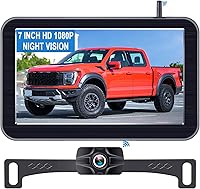
The Pemacom system has a magnetic camera mount, a 7-inch LCD display and a stated 170-degree field of view. It includes a rechargeable battery and a solar panel, so check charging needs and available sun for your driving routine.
For a permanent installation with a cable connection, compare the best wired backup camera systems. If your main need is a pickup fit, see our backup cameras for pickup trucks guide.
What is the best system for an RV?
For an RV, look first for a camera setup that matches its wiring preparation and the views you need. A rear camera can help with reversing, while additional cameras can provide side views or broader coverage.
Yakry's system supports up to 4 cameras and offers a 7-inch monitor. It can be used for reversing or as a constant rear view, which may suit drivers who want to monitor behind the RV while moving.
Check that your RV's camera prep matches the bracket and connector before buying. Our backup camera guide for motorhomes and guide to hooking up an RV camera cover larger vehicle needs.
When does a wired system make more sense?
A wired system can make sense when you want a fixed camera and monitor connection and can route cable along the vehicle. It also avoids relying on a wireless signal between the camera and display.
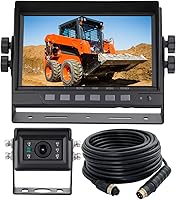
The ATPTK system is built for a broad set of vehicles, including pickup trucks, buses, motorhomes and heavy equipment. It uses a 4-pin screw-lock connector, so check the connection type and cable route before installation.
Wiring takes planning around trim, weather seals and power. See how to mount a backup camera for placement advice, and read how to connect a backup camera to reverse lights if you want the monitor to activate when backing up.
When do multiple camera views help?
Multiple views help when a long or wide vehicle leaves blind areas that a single rear camera cannot cover. A multi-camera monitor can show rear and side views together, depending on its layout.
The VOONOA system includes four cameras, a 10.36-inch monitor and DVR recording across four channels. It is designed for vehicles such as RVs, trucks, trailers, buses and tractors, with 12–36 V DC power.
The larger screen and multiple camera feeds require a place for the monitor and routes for the camera cables. For an RV or towing setup, our backup camera guide for travel trailers explains how to plan a rear camera position.
What should you check before buying a backup camera system?
Check compatibility, power and placement before comparing extra features. A camera that cannot mount securely or connect to the monitor will not suit your vehicle.
Will the camera fit the vehicle?
Confirm the mounting type and surface. A magnetic camera needs a suitable metal location, while a bracket mount may require an existing camera prep or a planned attachment point.
Measure the camera position and check that it won't be blocked by a tailgate, spare tire, ladder, hitch or cargo. A clear view of the area behind the vehicle matters more than a wide angle alone.
If you're unsure whether camera and monitor parts can be mixed, review whether backup cameras are universal. Different systems may use different connectors, signals and power requirements.
How will the camera and monitor get power?
Power arrangements vary by system. A rechargeable camera, vehicle-powered camera and monitor that plugs into a cabin outlet each need a different setup.
Plan how often you'll charge a battery camera and whether sunlight can help maintain its charge. For a wired camera, check the vehicle's voltage and follow the system's instructions for connecting power.
A reverse-triggered monitor can turn on when the vehicle shifts into reverse, while a constant-view setup may stay on during a drive. Read how backup cameras get power for a closer look at common wireless options.
Is the wireless signal suitable for the vehicle?
Wireless systems send video from the camera to a monitor without a direct video cable. Vehicle length, obstructions and interference can affect whether the signal suits your layout.
Check the stated working distance and whether it applies to an open area or a vehicle installation. A long range claim in open space may not reflect a signal passing through a vehicle body or other equipment.
For more on the trade-offs, read do wireless backup cameras work well?. If the vehicle is especially long, consider a wired system or a wireless model designed for RV use.
What screen size and camera angle do you need?
A larger monitor can make the image easier to view, but it also takes more dashboard space. Place it where it is visible at a glance and does not block your view through the windshield.
Field of view is another trade-off. A wider angle shows more area but can make objects look farther away, so use mirrors and direct checks when judging distance.
Compare screen size, camera angle and image format together. A wide view on a small display may not give the same practical detail as a narrower image on a well-placed screen.
Do you need night vision or weather protection?
Night vision features can help the camera show a view in low light, while weather protection matters for a camera exposed at the rear of a vehicle. Check the specific camera's weather rating and temperature range where available.
Keep the lens clean and verify the view after installation. Dirt, water droplets and glare can reduce visibility even when the camera includes night vision.
Do not rely on the camera as your only view when reversing. Use mirrors, check around the vehicle and move slowly.
How should you choose between a rear camera and a multi-camera system?
Choose a single rear camera for a basic view behind the vehicle and a multi-camera system when you need several angles. More cameras can add useful coverage, but they also add installation steps and screen complexity.
A car or pickup used for ordinary parking may only need one rear camera. A motorhome, bus or wide work vehicle can benefit from extra side views where mirrors leave gaps.
Think through how you will use each view before paying for cameras you may rarely check. If you tow, a separate trailer camera can make more sense than adding side cameras to the tow vehicle.
For broader coverage comparisons, see backup camera vs 360 camera. A 360-degree system combines several views differently from a standard rear camera, so compare the view type you actually need.
What are the main trade-offs between wired, wireless and magnetic systems?
A wired system prioritizes a direct cable connection, wireless reduces video cable routing, and magnetic mounting can simplify temporary placement. Each approach still needs a suitable power plan and secure installation.
| System style | Main benefit | Main trade-off |
|---|---|---|
| Wired | Direct camera-to-monitor connection | Cable routing takes time |
| Wireless | Less video cable between camera and screen | Signal depends on vehicle layout |
| Magnetic | Camera can attach without drilling at the mount point | Needs a suitable metal surface and charging plan |
| Pre-wired RV | Can use existing camera preparation | Must match the RV's bracket and connector |
| Multi-camera | Several views can reduce blind areas | More cameras, cables and screen choices |
A magnetic system can be useful for a temporary setup or a vehicle where drilling is not wanted. A fixed wired camera may be a better match for regular use if you can route and protect the cable.
A pre-wired RV system can simplify the connection only when the vehicle prep matches. Verify the bracket, connector and power arrangement before ordering.
How can you plan a clean installation?
Plan camera position, monitor location and cable or power routes before attaching anything. A few minutes of measuring can prevent a blocked view or a display that sits out of reach.
- Identify a camera location with a clear view behind the vehicle.
- Check that the camera mount fits the surface and stays clear of moving parts.
- Pick a monitor position visible from the driver's seat without blocking the windshield.
- Trace the cable or wireless power route before securing it.
- Test the image while parked and adjust the camera angle.
- Check the view again with the vehicle loaded or hitched if that changes the rear area.
The right camera angle depends on where you mount it and what sits behind the vehicle. Our camera mounting guide explains how to aim for the useful area.
After installation, confirm that the camera turns on as expected and that the image is stable. If you see a blank or unreliable picture, use backup camera troubleshooting steps.
Which backup camera system should you choose?
Choose the simplest system that fits your vehicle and gives you the view you need. A magnetic wireless camera can suit a car or pickup, a compatible pre-wired kit can suit an RV, and a wired or multi-camera system can fit larger vehicles.
Pick a wired setup if you prefer a fixed connection and can route the cable. Choose multiple cameras only when the extra angles help with the vehicle's actual blind areas.
Before buying, confirm mount fit, power, monitor placement and compatibility. Then use the vehicle-specific guides above to plan the camera position and hookup.
Frequently asked questions
What is the best backup camera system for a car?
For a car, start with a system that fits your mounting and power options. A magnetic wireless camera can avoid a cable run if the vehicle has a suitable metal mounting spot, while a wired kit may make sense if you want a fixed installation.
Check monitor placement and camera compatibility before choosing.
Is a wired or wireless backup camera better?
A wired system connects the camera and monitor with a cable, while a wireless system sends the picture by radio. Wiring can suit a permanent installation, and wireless can reduce cable routing.
Signal distance, power, mounting and vehicle layout matter more than the label alone.
Can I use a backup camera system on an RV?
Yes, some systems are made for RVs and can support longer vehicle layouts or multiple camera views. Check whether your RV is pre-wired for a specific bracket, how many cameras the monitor supports, and whether the camera can remain on for a rear view while driving.
Do backup cameras work at night?
Many backup cameras include night vision features, but visibility depends on the camera, lighting, glare and screen placement. Check the system's night vision details and keep the camera lens clean.
A camera view can help with awareness, but it does not replace mirrors or looking around.
Are backup camera systems universal?
No, backup camera systems are not universally compatible. They can differ in signal type, connector, voltage, monitor input, mounting and trigger wiring.
Compare the camera and monitor requirements with your vehicle before buying, and use our guide to backup camera compatibility to check the main fit questions.