Hooking a Backup Camera to Your Reverse Lights
To hook up a backup camera to reverse lights, connect the camera’s power lead to the reverse light’s positive wire and ground the camera as its instructions specify. Connect the monitor’s reverse trigger input to the reverse light circuit so the display switches on when you shift into reverse.
On this page (9 sections)
- What connects to the reverse light circuit?
- What should you check before wiring?
- How do you hook up a backup camera to reverse lights?
- How does the monitor’s trigger wire work?
- How do you route the video cable?
- How do you test the camera after wiring?
- Why might a backup camera not switch on in reverse?
- Should the camera run only in reverse?
- What is the safe way to finish the installation?
To hook up a backup camera to reverse lights, connect the camera’s power lead to the reverse light’s positive wire and ground it as the camera instructions specify. Connect the monitor’s reverse trigger input to the same reverse light circuit if you want the screen to switch on automatically in reverse.
The exact wiring depends on your camera and vehicle. Use the wiring diagrams for both, confirm each wire’s function before connecting anything, and disconnect power before making connections.
What connects to the reverse light circuit?
The reverse light circuit can power the camera and provide a reverse signal to the monitor. These are separate jobs, even when they connect to the same circuit.
A basic wired setup has three paths:
- Power: The camera receives power when the vehicle is in reverse.
- Ground: The camera returns current through a ground connection specified by its instructions.
- Video and trigger: The camera sends video to the monitor, while the monitor’s trigger input tells it when to show that video.
Some kits combine the video cable and trigger wire in one run. Others use separate wires, so check the system’s wiring diagram before starting.
What should you check before wiring?
Check the camera, monitor, and vehicle instructions before connecting wires. Wire colors and trigger arrangements can vary, so don’t assume a wire’s purpose from its color alone.
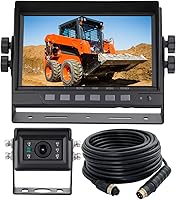
Confirm that the camera and monitor are compatible. For example, the ATPTK 7-Inch Wired AHD Backup Camera System uses aviation 4-pin screw connectors, so an RCA extension cable won’t connect its camera to the monitor.
Check the power requirements and connection type in the system instructions. If the vehicle has a complex electrical system or the wiring diagram is unclear, ask a qualified installer to identify the correct circuit.
Our guide to how to test a backup camera covers checks to make before and after installation. For a different camera or display pairing, read are backup cameras universal?.
How do you hook up a backup camera to reverse lights?
Connect the camera’s power lead to the reverse light’s positive wire, then connect the monitor’s trigger input to the reverse signal if automatic display switching is needed. Follow the wiring diagrams for the vehicle and camera, and secure each connection as instructed.
- Park safely, apply the parking brake, and switch off the vehicle.
- Locate the reverse light wiring using the vehicle’s service information.
- Confirm which wire supplies power only when the vehicle is in reverse.
- Connect the camera’s power lead and ground according to the camera instructions.
- Run the video cable to the monitor and connect the monitor’s trigger input to the reverse light circuit if required.
- Secure the wires away from moving parts, hot surfaces, sharp edges, and areas where water can collect.
- Restore power and test the image while the vehicle is stationary.
Don’t work with exposed wiring while the circuit is powered. If the vehicle instructions require a fuse or a specific connection method, follow them.
How can you identify the reverse light wire?
Use the vehicle wiring diagram to identify the reverse light circuit. If the instructions allow electrical testing, use an appropriate meter and follow its safety directions to confirm that the wire is powered only in reverse.
Never rely on wire color alone. If you can’t confirm the circuit safely, stop and ask an installer to identify it.
How does the monitor’s trigger wire work?
The trigger wire carries a reverse signal to a compatible monitor or head unit. When it detects that signal, the display can switch to the camera image.
A trigger wire is not the same as the RCA video connection. An RCA cable carries the video signal; its trigger wire connects to the monitor’s compatible reverse input when the system uses one.
The EWAY 20-Foot RCA Extension Cable with Trigger Wire combines an RCA video cable and trigger wire for compatible systems. Its instructions say the trigger wire is for a head unit with a trigger input.
Some monitors use a separate trigger lead, while others have different connections. Follow the wiring diagram for your equipment instead of connecting a trigger wire to a connector that only accepts video.
How do you route the video cable?
Route the video cable from the camera to the display along a protected path. Keep it clear of moving, hot, or sharp parts, and secure it so it won’t sag or rub through.
For a vehicle with an RCA camera and monitor, the GreenYi 10-Foot Backup Camera Extension Cable can extend an RCA video connection. It includes a female-to-female RCA coupler and a trigger detection wire for compatible displays.
Measure the cable path before choosing an extension. If your system uses a connector other than RCA, choose a cable that matches its connectors and wiring diagram.
For camera placement advice, see how to mount a backup camera. If you’re still choosing a system, compare options in our best backup camera systems guide.
How do you test the camera after wiring?
Test the system while the vehicle is parked and the area around it is clear. Confirm that the camera image appears in reverse and that the monitor returns to its previous mode after you shift out of reverse, if the system is designed to do that.
Check that the image is stable and oriented correctly. Ask someone to watch the display while you shift into reverse, keeping the parking brake applied and following the vehicle’s instructions.
If the screen stays blank, check the power, ground, video connection, and monitor input against the wiring diagram. If the image appears but the monitor doesn’t switch automatically, check the trigger connection and display settings.
Why might a backup camera not switch on in reverse?
A camera that stays off or fails to switch may have a loose power connection, an incorrect trigger connection, or a monitor set to the wrong input. Check each connection against the equipment instructions before changing the wiring.
If the camera works only when powered another way, that points to a possible issue in the reverse light power connection. Don’t bypass a fuse or connect wires at random to keep troubleshooting.
Use why a backup camera may not be working for a broader fault check. If the camera works but the picture looks unclear, see why a backup camera can look blurry or foggy.
Should the camera run only in reverse?
Use reverse light power when you want the camera to turn on only in reverse. Some systems also offer a continuous view, but only use that mode if the system supports it and the wiring instructions explain how to power it.
The ATPTK system supports viewing in reverse or continuously and has two trigger wires. Follow its instructions to choose the mode and make the connections.
If the camera or monitor behaves differently from the instructions, stop and check the wiring diagram before using the system. A camera view can help when reversing, but it doesn’t replace mirrors or a direct check of the area behind the vehicle.
What is the safe way to finish the installation?
Secure the connections, test the view, and verify automatic switching before driving. Keep wiring protected from damage and follow the vehicle and camera instructions for any final checks.
Pick a compatible camera and display first, then match each connection to its wiring diagram. Use the reverse light circuit for power and triggering only when the system’s instructions support that setup, and consult an installer if you can’t verify the wiring.
Frequently asked questions
Which wire on a backup camera connects to the reverse light?
Connect the camera's power lead to the reverse light's positive wire, following the camera and vehicle instructions. The monitor's reverse trigger input also connects to the reverse light circuit when automatic switching is needed.
Wire colors vary, so confirm each wire's function before connecting.
Does a backup camera need to connect to reverse lights?
A camera can use reverse light power so it turns on when you shift into reverse, but some systems use another power source or stay on continuously. The monitor also needs the right trigger connection if you want it to switch to the camera view automatically.
Can I connect the camera trigger wire to the reverse light?
Yes, a monitor or head unit trigger wire can connect to the reverse light circuit when its instructions call for a reverse signal. Some cables carry a trigger wire along the video cable.
Connect it only to a compatible reverse trigger input, not to the RCA video connector.
Why does my backup camera stay on after shifting out of reverse?
The monitor may be set to stay on continuously, or its trigger input may be connected to a power source that remains live. Check the monitor settings and trace the trigger wire to confirm it receives power only in reverse, using the vehicle and camera instructions.