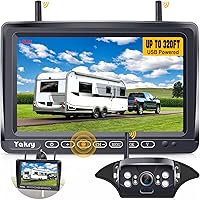
How to Add a Backup Camera to a Travel Trailer
Choose a camera system that matches your trailer, mount it securely, provide power, and pair its monitor before you rely on the view. A wireless system can reduce cable routing, while a pre-wired trailer may accept a compatible camera at its rear mount.
On this page (8 sections)
- What do you need to add a backup camera to a travel trailer?
- How do you choose a camera system for your trailer?
- Where should you mount the camera?
- How do you install a camera on a pre-wired trailer?
- How do you install a wireless or magnetic camera?
- How do you connect the monitor and check the view?
- What should you check before towing?
- Which camera setup fits your travel trailer?
To add a backup camera to a travel trailer, mount a compatible camera at the rear, power it as instructed, and connect its view to a monitor in the tow vehicle. A wireless system can avoid running a video cable through the trailer, while a pre-wired mount may simplify installation if the camera fits it.
Start by checking what the trailer already has. Look for a camera mount and wiring port, then confirm what system they support before buying a camera.
If there is no pre-wire, choose a mounting method and power source that suit the trailer's materials and your plans for the camera.
What do you need to add a backup camera to a travel trailer?
You need a compatible camera, a monitor or receiver, a secure mounting location, and a way to power the camera and display. Some kits include both the camera and monitor; other setups rely on trailer wiring or a compatible pre-wired connection.
Decide whether you need a rear view only or want the option to add more cameras later. For example, the AMTIFO system supports up to 4 cameras, while a simpler single-camera system may be enough if you mainly need help backing into a site.
Check the trailer manual and camera instructions before connecting wiring. The connector shape alone may not confirm that the camera, power, and monitor work together.
How do you choose a camera system for your trailer?
Choose a system based on the trailer's existing wiring, camera power needs, mounting surface, and how you want to use the image. A pre-wired camera is often the simplest fit when the trailer has a compatible mount; a magnetic camera can be moved between suitable metal surfaces.
For a pre-wired Furrion mount, the AMTIFO camera is designed for Furrion pre-wired RVs and includes an adapter plate and pigtail wire. Its monitor can handle up to 4 cameras, which may help if you want views beyond the trailer's rear.
If you want a portable camera, first check whether the mounting surface attracts magnets. Pemacom says its system is also compatible with Furrion and Voyager series RVs, but the trailer's particular connection still needs to match.
The DOUXURY also uses a magnetic base and solar charging. Its instructions say the base does not attach to aluminum, so a nonmagnetic trailer surface calls for another mounting plan.
For more on the tradeoffs, see how wireless backup cameras work and our guide to wireless backup cameras for trailers.
Where should you mount the camera?
Mount the camera near the rear centerline, where it can show the space behind the trailer without being blocked by trim, a ladder, or cargo. A centered view can make it easier to judge the trailer's path while backing.
Before drilling or attaching a bracket, hold the camera in the proposed position and check the picture from the driver's seat. Confirm that the view includes the area you need, and that the camera will not block lights, license plates, or other required equipment.
Use a mount approved for the camera and the trailer surface. A magnetic base needs a suitable metal surface; if the rear panel is aluminum, fiberglass, or plastic, use a compatible bracket instead of relying on the magnet.
Our guide to mounting a backup camera so it sees the right spot covers placement checks and ways to avoid a poor viewing angle. Tighten fasteners as instructed and check the mount again after the first trip.
How do you install a camera on a pre-wired trailer?
A pre-wired trailer may let you attach a compatible camera at the existing rear mount and connect it to the trailer's camera wiring. The exact steps depend on the trailer and camera, so follow both manuals and confirm the connection before driving.
- Find the camera mount and wiring connection at the trailer's rear.
- Confirm that the camera is made for the trailer's pre-wire system.
- Turn off power as directed in the manuals.
- Fit the adapter or bracket, then connect the camera.
- Secure the camera and restore power as instructed.
- Pair the monitor and check the image before towing.
The AMTIFO system includes a Furrion adapter plate and pigtail wire for compatible pre-wired RVs. If your trailer uses a different system, don't assume the same parts will fit.
If the camera does not power up or the monitor shows no image, check the connection and power supply before changing wires. See how to hook up a backup camera on an RV for more on connecting an RV camera system.
How do you install a wireless or magnetic camera?
A wireless camera sends video to a monitor without a video cable, but it still needs power. Depending on the model, that may come from a power connection, a rechargeable battery, solar charging, or more than one option.
For a magnetic camera, attach it only to a surface that holds the magnet securely. Keep the camera positioned so it can see behind the trailer, then secure or route any charging or power cable according to its instructions.
The Pemacom has a solar panel and rechargeable battery, and its monitor can be powered by USB or a cigarette lighter adapter. The DOUXURY also offers solar and adapter charging; its instructions say solar output is lower than power use, so wired charging is part of its power plan.
A wireless monitor must also be placed where the driver can see it without losing attention from the road. Follow the monitor's mounting instructions, keep the screen clear of controls and airbags, and make any adjustments while parked.
How do you connect the monitor and check the view?
Power the monitor as directed, pair it with the camera, and test the image while the trailer is parked. Check that the view is stable, correctly oriented, and useful from the driver's seat before relying on it.
Have a helper stand behind the trailer at a safe distance and move through the areas you need to see. Confirm the monitor shows the helper and nearby obstacles, then check guide lines if your system has them.
Many systems let you switch between front and rear views or adjust the guide lines. Make those changes while parked and consult the monitor manual if the image appears reversed or the camera and screen do not pair.
For a step-by-step check, use how to test a backup camera before and after installation. If the screen stays blank, our guide to backup cameras that are not working covers common checks.
What should you check before towing?
Before each trip, make sure the camera is secure, powered, and showing a usable image. Check the mount, visible connections, monitor position, and battery level or charging setup.
Clean the lens and confirm the picture still covers the area behind the trailer. If the image becomes blurry or foggy, use these backup camera checks for a blurry view before adjusting the camera's position.
Use the camera as an extra view, not as a substitute for mirrors or a spotter. The screen can help you see behind the trailer, but it may not show every nearby object or the full side of the trailer.
Which camera setup fits your travel trailer?
Choose a pre-wired camera for a compatible mount, a magnetic system when you have a suitable metal surface, or a bracket and power connection that match an unprepared trailer. Confirm the trailer's wiring and surface before choosing a model.
The AMTIFO is a fit to consider for compatible Furrion pre-wired trailers, especially if you may add more cameras. Pemacom and DOUXURY offer magnetic mounting and solar charging, but each depends on a suitable surface and its own charging plan.
For a portable system, compare how wireless backup cameras get power. If you're choosing equipment for a fifth wheel, see how to choose a backup camera for a fifth wheel.
Frequently asked questions
Can you add a backup camera to a travel trailer?
Yes. You can add a camera system by mounting the camera at the trailer's rear, supplying its required power, and pairing it with a monitor in the tow vehicle.
If the trailer has a pre-wired camera mount, check system compatibility before connecting anything.
Where should a travel trailer backup camera go?
Mount it near the rear centerline, high enough to show the area behind the trailer and low enough to see useful obstacles. Check the camera's view from the driver's seat before tightening the mount, and follow the camera and trailer instructions.
Does a wireless trailer camera need power?
Yes. Wireless describes how video reaches the monitor, not how the camera gets power.
A camera may use a wired power connection, a rechargeable battery, solar charging, or a combination, so check its power needs and charging method.
Should a trailer camera stay on while towing?
That depends on the camera system and how you plan to use it. Some systems can show a live view while underway, while others are intended mainly for backing.
Follow the manual, mount the camera securely, and treat the screen as an aid rather than a replacement for mirrors and a spotter.