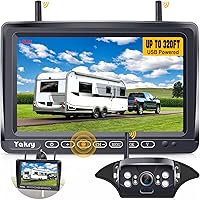
How to Hook Up a Backup Camera on an RV
To hook up a backup camera on an RV, check for a pre-wired camera mount, attach a compatible camera, connect its power, and power the monitor. Then pair the system as directed and check the view before relying on it.
On this page (8 sections)
- How do you hook up a backup camera on an RV?
- How can you tell if your RV is pre-wired?
- What if the RV has no camera pre-wire?
- How do you connect power to the camera?
- Where should you place the monitor?
- How do you aim and check the camera?
- What should you check if the camera has no picture?
- Which RV backup camera setup should you choose?
To hook up a backup camera on an RV, check for a pre-wired camera mount, attach a compatible camera, connect its power, and power the monitor. Pair the system as directed, then check the view while parked before relying on it.
The exact steps depend on whether your RV has a factory camera mount and wiring. A wireless system still needs power at the camera and monitor, even though it sends video without a cable between them.
How do you hook up a backup camera on an RV?
Use the RV's pre-wired camera location if your camera system supports it. Attach the camera with the bracket and wiring method specified for that system, then connect power and set up the monitor.
- Read the camera and RV manuals, and identify the camera's power needs.
- Check the rear of the RV for a camera mount, wiring, or a pre-wire cover.
- Confirm that the camera fits the mount and that the system is compatible.
- Attach the camera and make its power connection as instructed.
- Place and power the monitor, then pair it with the camera if required.
- Check the picture and adjust the camera angle before driving.
A pre-wired mount can reduce the amount of installation work, but it doesn't guarantee that every camera will fit or communicate with the RV's existing system. For a trailer-specific walkthrough, see how to add a backup camera to a travel trailer.
How can you tell if your RV is pre-wired?
Look for a covered camera mount or a wiring connection near the upper rear of the RV. Check the RV manual or ask the manufacturer if you can't tell whether the opening includes power wiring.
A mount that looks suitable may use a connection made for a particular camera system. Compare the connector, bracket, power requirements, and compatibility notes before ordering.
Some camera systems include an adapter bracket and pigtail harness for Furrion pre-wired RVs. For example, the Yakry system is described for Furrion pre-wired RVs and includes a Furrion bracket and pigtail wire.
For a closer look at that model, read our Yakry wireless RV camera review. If you're choosing a system for a camper, compare the options in backup cameras for campers and camper trailers.
What if the RV has no camera pre-wire?
You can use a system designed for a separate camera power connection. Choose a mounting position and power source that follow the camera instructions and the RV wiring diagram.
Some systems can connect to a 12V power source when there is no factory pre-wire. The AUTO-VOX system describes this option, as well as an adapter bracket and pigtail harness for pre-wired RVs.
Don't drill through the RV wall until you've checked for hidden wires, plumbing, and structural supports. If you aren't sure how to access a safe power connection, have an RV technician handle that part.
How do you connect power to the camera?
Follow the camera's wiring diagram and use the power source it specifies. A wireless video connection does not remove the need to power the camera.
The connection method varies by camera and RV. Some installations use power at the rear camera location; others use a connection associated with the reverse lights, which may make the camera active only while backing up.
Before connecting wires, identify the circuit and check whether it supplies the power the camera requires. For more detail on that option, see how to hook up a backup camera to reverse lights.
Fookoo notes that its wireless camera and monitor each need a power cord, with a stated operating voltage range of DC 12–24V. Its system is described as fitting most Furrion pre-wired mounts, but it is not compatible with the Furrion system because their technologies differ.
The camera and monitor need power even when their video connection is wireless. If you see flickering or no picture after connecting power, check the circuit and system instructions before changing wiring.
Where should you place the monitor?
Mount the monitor where you can glance at it without blocking your view of the road. Follow the system instructions for its mount and keep the display secure.
The monitor needs power too, so plan its cable route before fixing it in place. Keep the cable clear of pedals, controls, and airbag areas, and avoid running it where a door or trim panel could pinch it.
A clear view of the screen helps you use the camera as an added view while maneuvering. It does not replace checking mirrors, looking around the vehicle, or using a spotter when needed.
How do you aim and check the camera?
Check the image while parked and adjust the camera until the view covers the area you need. Ask a helper to stand in a safe spot behind the RV while you confirm what appears on screen.
Keep the RV stationary during this check. Don't ask anyone to walk behind a moving vehicle or use the camera image as the only check for people or obstacles.
If the system has adjustable guide lines, follow its instructions to turn them on or off and set the camera view. For steps to check a system before and after installation, see how to test a backup camera.
What should you check if the camera has no picture?
Check power at both the camera and monitor, then verify the pairing and connections. Consult the manuals for indicator lights, pairing steps, and troubleshooting specific to the system.
If the camera works only when the RV is in reverse, that may be expected if it uses a reverse-light power connection. If it flickers, confirm that its circuit provides a steady power source suitable for the system.
Work through the basic checks before removing the camera or changing wires. Our guide to why a backup camera may not be working covers common symptoms and next steps.
Which RV backup camera setup should you choose?
Choose a pre-wired-compatible camera if your RV has a suitable factory mount and connection. Choose a system with a separate power option if there is no camera pre-wire, and follow its wiring and mounting directions.
The Yakry system includes a Furrion bracket and pigtail wire for compatible RVs. The Fookoo system describes a fit for most Furrion pre-wired mounts and uses a DC 12–24V power source.
AUTO-VOX describes both pre-wired installation and a separate 12V power option.
For a broader motorhome comparison, read backup cameras for motorhomes and Class A RVs. Before driving, make sure the camera is secure, the monitor is powered, and the image shows the area you expect.
Frequently asked questions
Can I install an RV backup camera without a pre-wired mount?
Yes, some wireless RV camera systems can be mounted without factory pre-wiring, but the camera still needs a suitable power source. Follow the system's instructions for mounting and wiring, and check the RV's manual before making holes or connecting to a circuit.
Does a wireless RV backup camera need power?
Yes. Wireless describes how video travels from the camera to the monitor; it does not mean the devices run without power.
Check the camera and monitor instructions for their required power connections and voltage before installation.
Can an RV camera use the reverse lights for power?
It may be possible if the camera is designed for that connection and the circuit supplies the power it needs. Confirm the camera instructions and RV wiring diagram first, since a reverse-light connection may provide power only while backing up.
How do I check an RV backup camera after installation?
Park the RV, turn on the camera and monitor, and confirm that the image appears and shows the area behind the vehicle. Ask a helper to stand in a safe, visible place while you check framing, then adjust the camera or monitor as the instructions allow.