Rear View Camera vs Backup Camera: Is There a Difference? (October 2026)
The terms often mean the same thing: a camera that shows the area behind your vehicle. Some rear view camera systems show a continuous view, while a backup camera is commonly set to turn on when you shift into reverse.
On this page (6 sections)
The terms rear view camera and backup camera often mean the same thing: a camera that shows the area behind your vehicle. A key difference is how the image is used: some systems turn on in reverse, while others can provide a continuous rear view.
The names alone don't tell you whether a system uses a mirror display, a separate monitor, a wired video connection or a wireless camera link. Check its power and trigger setup before choosing.
 Best for a mirror display
AUTO-VOX Rear View Mirror Camera, 4.3-Inch Monitor

Rear view camera vs backup camera: what is the difference?
The difference is usually the viewing purpose and trigger, not the camera's position. A backup camera typically helps you see behind the vehicle while reversing; a rear view camera may also refer to a system used for ongoing rear visibility.
These labels overlap in product names and descriptions. A system called a rear view camera can serve as a backup camera, and many backup camera systems can be configured to show the rear image continuously.
The practical questions are more useful than the label: Does the camera turn on automatically in reverse? Can it stay on while driving?
Where does the image appear, and what kind of wiring does the setup need?
For another kind of camera view, see our comparison of a backup camera and a 360 camera. A 360 system aims to show multiple areas around the vehicle, which is a different job from a single rear-facing camera.
When does a camera show the rear image?
A reverse-triggered camera shows its image when the vehicle shifts into reverse. A continuous-view setup can show that image whenever the system is powered, depending on the camera and monitor configuration.
Reverse triggering is useful when you want the screen to appear automatically for backing up. Some systems use a wire connected to the reverse lamp as the trigger, so installation involves matching the system's wiring instructions to your vehicle.
A continuous view can help when you want to monitor what is behind you beyond the moment of reversing. It doesn't expand the camera's coverage or replace checking the road, mirrors and surroundings.
The ATPTK wired system supports both reverse-triggered and continuous viewing options. The AUTO-VOX mirror camera can show the image automatically in reverse or with constant power.
Can a backup camera stay on while driving?
Some systems can show a continuous rear image, but the exact option depends on the system and its wiring. Check the instructions before choosing a camera for this use.
A reverse-only display may suit a driver who wants the screen available when backing into a space. A continuous display may suit a vehicle where seeing behind the vehicle while moving is part of the intended setup.
Keep the camera's view in context. It only shows what its lens captures, and conditions such as dirt, water or an obstructed camera can affect visibility.
Which display style fits your vehicle?
Choose the display that lets you see the image clearly without interfering with your normal driving view. Common options include a separate monitor or a mirror-style screen.
A separate monitor gives you a dedicated display location, often on the dash or windshield. The ATPTK and LeeKooLuu options both use a 7-inch monitor, while the AUTO-VOX option uses a 4.3-inch screen in a mirror-style setup.
A mirror display may suit you if you prefer the rear image near the factory mirror. Check whether the mount fits your vehicle and whether the screen placement works with your normal view.
The AUTO-VOX rear view mirror camera pairs a mirror-style display with a wired video connection. It can show the rear image automatically in reverse or with constant power.
If you want a larger separate screen, compare monitor size and placement before buying. Our guide to backup camera systems covers different setups for cars, trucks and RVs.
Should you choose wired or wireless?
Choose wired if you prefer a cable between the camera and display; choose wireless if you want the image sent without that video cable. Both types still need power.
A wired system can require routing a cable from the camera to the monitor. The ATPTK system uses waterproof 4-pin screw connectors, and the AUTO-VOX system sends video through a cable.
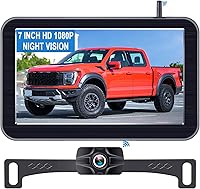
The LeeKooLuu camera and monitor connect wirelessly, but the camera still needs a power connection. Its setup instructions describe connecting the monitor to vehicle power and the camera to a power source such as the reverse light or running lights.
Wireless describes the camera-to-monitor connection, not a fully cable-free installation. Check where each component gets power and whether your vehicle provides a suitable connection.
Our guide to wireless backup cameras for cars explains the setup questions to consider before choosing a wireless system.
What should you check before buying?
Match the camera system to your vehicle, screen preference and power connections. The phrase rear view or backup camera doesn't guarantee a particular installation or viewing mode.
Check these points before you choose:
- Display location: Decide whether you want a mirror-style monitor or a separate screen.
- Power and trigger: Confirm how the camera and display get power, and whether reverse gear triggers the image.
- Video connection: A wired system uses a cable to send the camera image; a wireless system still needs power at the camera.
- Vehicle fit: Check the mounting method, cable route and system voltage against your vehicle.
- Camera count: If you want more than one view, confirm the monitor can support additional cameras.
The guide to mounting a backup camera can help you plan the camera position and the view you want. For questions about compatibility, see whether backup cameras are universal.
Which term should guide your choice?
Focus on the system's behavior and display, because the names overlap. Pick a reverse-triggered setup if you mainly need help while backing up, or a continuous-view option if you want the rear image available while the system is powered.
Choose a mirror-style screen if that placement suits your vehicle, a separate monitor if you want a dedicated display, and wired or wireless based on the installation route you can support. Confirm the system's power and trigger details before you buy.
For more options across vehicle types and installation styles, browse our car and pickup camera guide.
Sources:
- National Highway Traffic Safety Administration: Rear Visibility
- AUTO-VOX rear view mirror camera
Frequently asked questions
Is a rear view camera the same as a backup camera?
Often, yes. Both terms can describe a camera that sends a view behind the vehicle to a screen.
Some systems display the image only when you reverse, while others can stay on for a continuous rear view, so check how the exact system is powered and triggered.
Does a rear view camera stay on while driving?
It depends on the system and how it is connected. Some can show a continuous image when powered, while others turn on through a reverse trigger.
Read the system instructions and follow local rules for screen use while driving.
Do rear view cameras replace side mirrors?
A rear view camera shows the area captured by its rear-facing camera, but it doesn't automatically replace your side mirrors. Keep using your mirrors and check your surroundings directly, since a camera view has limits and may not show every nearby object.
Is a wired or wireless backup camera better?
A wired system connects the camera and monitor with a cable, while a wireless system sends the camera image to the monitor without that video cable. Both still need power.
Choose based on your vehicle, installation route and preferred screen setup.
Can a backup camera show a continuous view?
Some can. The ATPTK system supports reverse-triggered or continuous viewing, and the AUTO-VOX mirror camera can show the image with reverse or constant power.
Confirm the wiring and operating instructions for the system you choose.