Are Backup Cameras Universal? What Fits Your Vehicle
Backup cameras are not universally interchangeable. A camera must match your monitor’s signal and connector, power source, mounting space, and vehicle wiring; many complete kits fit a broad range of vehicles.
On this page (6 sections)
- What makes a backup camera compatible with a vehicle?
- Does a complete kit fit more vehicles than a replacement camera?
- Does “wireless” mean a backup camera is universal?
- Can you connect an aftermarket camera to a factory screen?
- What should you check before mounting a backup camera?
- Which type of backup camera should you choose?
Backup cameras are not universally interchangeable. A camera must match your monitor’s signal and connector, power source, mounting space, and vehicle wiring; many complete kits are designed to work across several vehicle types.
The simplest path is usually a complete camera-and-monitor kit, since its parts are intended to work together. Replacing only a camera or connecting one to a factory display takes more compatibility checks.
What makes a backup camera compatible with a vehicle?
Compatibility depends on the camera, monitor, power, wiring, and mounting location working together. A camera advertised for cars or trucks may still need a particular screen or installation setup.
Check these points before choosing:
- Monitor and video signal: The screen must accept the camera’s video signal. AHD and CVBS are different formats, so a camera and display using different formats may not show a picture.
- Connector: Plugs vary between systems. A matching shape alone may not confirm that the wiring or signal is compatible.
- Power: The camera and monitor each need a suitable power source. A wireless camera may still need a power wire at the rear of the vehicle.
- Mounting: Confirm that the camera can attach securely where you want it. License plate areas, tailgates, and vehicle bodies differ in shape and available space.
- Vehicle wiring: Reverse lights, running lights, and other circuits may be used to power or trigger a camera, depending on the kit and how you want it to operate.
If you're adding a camera to an older vehicle, our guide to adding a backup camera to an older car explains the complete-kit approach.
Does a complete kit fit more vehicles than a replacement camera?
A complete kit can be easier to match because its camera and monitor are sold as a system. You still need to check that the mounting and power setup suits your vehicle.
A kit with a separate monitor can avoid the need to connect a camera to a factory display. For example, the LeeKooLuu 1080P Plug and Play Backup Camera comes with a 4.3-inch monitor and uses a 4-pin video power cable between the camera and screen.
The manufacturer describes it for cars, trucks, trailers, vans, SUVs, and campers. Before buying, check that you have a path for the cable and a suitable place for the monitor.
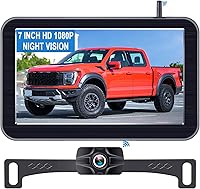
If you want a wider screen for a pickup, the LeeKooLuu 7-Inch Wireless Truck Backup Camera includes a 7-inch monitor and a wireless video connection. Its camera still needs power, and the monitor needs vehicle power.
The camera is designed for standard license-plate mounting on many pickups. Confirm your mounting area and power plan before ordering.
Does “wireless” mean a backup camera is universal?
No. Wireless refers to the video link, not universal compatibility or power.
The camera and monitor still need to work as a pair.
Both may need power.
Some wireless systems send video between a rear camera and a separate display, which can reduce the need to run a long video cable through the vehicle. The camera still needs a nearby power source, and installation may involve vehicle wiring.
Our guide to wireless backup cameras for cars covers what to check when choosing that setup. If you're comparing wireless and wired systems, see how wireless backup cameras work.
Can you connect an aftermarket camera to a factory screen?
Only if the camera’s signal, connector, and power arrangement match the factory display. A camera that works with its included monitor may not connect directly to a different screen.
Check the vehicle manual, screen documentation, or manufacturer support for the required camera format and connector. If those details are unclear, ask an installer to confirm the match before you buy or splice wires.
Signal format matters as well. Our explanation of [AHD vs.
CVBS backup cameras](/backup-camera-ahd-vs-cvbs/) describes why two cameras that look similar may not produce a usable picture on the same monitor.
What should you check before mounting a backup camera?
Confirm the camera has a secure mounting point and a clear view of the area behind the vehicle. A camera that fits electrically still needs a practical place to attach.
Measure the available space and check whether the mount blocks a plate, handle, or other equipment. Also consider how the camera cable will reach its power source, or where a wireless camera can connect to power.
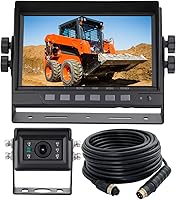
The eRapta 7-Inch 2K Wired Backup Camera Kit for Trucks includes a monitor, camera, 33-foot power cable, car charger, and two brackets. It can suit a vehicle where a wired connection is practical and a larger monitor has a place on the windshield or dashboard.
Check the route before installing, especially if the vehicle is long or the cable must pass through tight spaces. For mounting guidance, see how to mount a backup camera.
Which type of backup camera should you choose?
Choose a complete kit when you want its camera and screen to work together; choose a replacement camera only after confirming the existing screen’s requirements. Then match the installation to your vehicle’s power, cable route, and mounting area.
For a pickup with room for a larger display, consider the LeeKooLuu 7-Inch Wireless Truck Backup Camera. For a compact wired setup, consider the LeeKooLuu 1080P Plug and Play Backup Camera; for a longer cable run, consider the eRapta 7-Inch 2K Wired Backup Camera Kit for Trucks.
Before buying, compare the connections and power plan with your vehicle. For more options, browse backup camera systems for cars, trucks, and RVs.
A backup camera is universal only in the broad sense that many kits are made for multiple vehicle types. The camera itself must still match the screen, wiring, power, and mounting needs of your specific vehicle.
Frequently asked questions
Are backup cameras universal?
No. Some complete camera kits support many vehicle types, but an individual camera may use a signal, connector, voltage, or mounting method that does not match your vehicle or existing monitor.
Check the kit’s compatibility details and your vehicle’s wiring before buying.
Can I use any backup camera with my factory screen?
No, a factory screen may require a camera with a compatible video signal, connector, and power setup. Check the vehicle and screen documentation or ask a qualified installer to confirm compatibility before connecting an aftermarket camera.
Do wireless backup cameras need wires?
Wireless describes how the camera sends its video to the monitor; it does not always mean the camera runs without a power wire. Many wireless systems still need power at the camera, while the monitor also needs power.
Can I install a backup camera on an older car?
Often, yes. A complete aftermarket kit can add a camera and screen, but you still need a suitable mounting location and power source.
For a factory-screen setup, confirm the signal and wiring match before choosing a camera.