Backup Camera vs 360 Camera: Which View Do You Need? (October 2026)
Choose a backup camera for a clear rear view; choose a 360 camera system when you need views around a large vehicle. A backup camera vs 360 camera choice depends on how many sides you need to monitor and how much installation your vehicle can support.
On this page (8 sections)
- Backup camera vs 360 camera: what is the difference?
- Which view do you need for your vehicle?
- Does “360 camera” mean a bird’s-eye view?
- How do installation and vehicle fit compare?
- Which screen layout is easier to use?
- What do night vision and weather ratings tell you?
- Which camera system should you choose?
- FAQ
Choose a backup camera for a view behind your vehicle; choose a multi-camera system when you need front and side views too. In a backup camera vs 360 camera comparison, the main difference is coverage: one camera focuses on the rear, while a multi-camera setup can show several angles.
The phrase “360 camera” can mean different things. Some systems combine images into a bird’s-eye view, while others show several separate camera feeds on a split screen.
The products here are rear camera and multi-camera systems with different installation needs. We compared their stated camera counts, monitor layouts and vehicle fit to help you match coverage to your vehicle.
 Best for a quick rear view
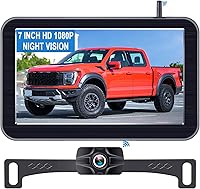
Pemacom 1080P Magnetic Wireless Backup Camera
 Best for four-sided coverage
VOONOA 10.36-Inch Quad Split RV Camera System, 4 Cameras
Backup camera vs 360 camera: what is the difference?
A backup camera shows the rear; a multi-camera system adds views from other positions. The label “360” alone doesn’t tell you whether the screen creates a stitched overhead image or displays separate feeds.
A rear camera usually sits at the back of a car or truck and sends its image to a monitor or compatible display. It can help you see obstacles behind you while reversing, but it does not show what is beside the front bumper.
A multi-camera kit may place cameras at the front, rear and sides. That broader view can be useful when a large vehicle has blind areas around its body, though the screen layout and camera placement determine what you actually see.
The VOONOA and Losuudy systems each include 4 cameras and split screen options. Their listed features describe multiple camera views, not a stitched overhead image, so don’t assume they create a bird’s-eye picture.
Which view do you need for your vehicle?
Choose a rear camera if your main concern is reversing; consider multiple views when the vehicle’s front and sides are hard to see. Your vehicle size, parking space and usual maneuvers matter more than the name used for a camera system.
A car or pickup driver who mainly backs into driveways may only need a rear view. A long RV, bus or truck can benefit from extra angles when turning or maneuvering in tight spaces.
Before choosing, stand around the parked vehicle and note where the body blocks your view. Think about low obstacles, nearby walls, trailer corners and the distance between the driver’s seat and the rear.
Our guide to backup camera systems for different vehicles explains how to compare screen and camera setups. If you need a rear camera for a specific vehicle, see our pickup truck camera guide or travel trailer camera guide.
When is a rear camera enough?
A rear camera may be enough when you want help with the area directly behind the vehicle and already use mirrors for the rest. It’s also a simpler fit if you don’t need camera views along the sides.
The Pemacom has one camera, a 7-inch monitor and a 170° field of view. Its magnetic base and wireless signal suit drivers who want a rear view without routing a camera cable through the vehicle.
This is still one camera angle. A wide field of view doesn’t give you front or side coverage, and objects near the edge may look different in size or distance.
When are several camera views useful?
Several cameras can help when you need to watch the front, rear and sides of a larger vehicle. A split screen can show multiple feeds at once, though it may make each view smaller.
The VOONOA includes 4 cameras and a 10.36-inch touch monitor with quad split viewing. The Losuudy also includes 4 cameras, with single, dual, triple and quad screen modes on its 10.1-inch monitor.
Both are wired systems. Plan where each camera will mount and how its cable can reach the monitor before deciding that broader coverage is worth the installation effort.
Does “360 camera” mean a bird’s-eye view?
No, not always; confirm how the system displays its camera feeds. A kit with cameras on several sides may show a split screen rather than joining the images into an overhead view.
A stitched surround view uses software to combine images from different cameras into one representation around the vehicle. That can help with close maneuvering, but the exact view depends on the system and its calibration.
A quad split monitor instead places multiple camera feeds on the screen at the same time. You see several directions, but the display is not automatically a single overhead image.
Ask what view the system produces and whether any calibration is needed. If the manufacturer doesn’t clearly describe a stitched image, treat “360” as a request to verify the display rather than proof of a bird’s-eye feature.
How do installation and vehicle fit compare?
A single magnetic camera can mean less cable work, while a multi-camera wired system needs camera placement and cable routing around the vehicle. Check mounting surfaces, cable paths and monitor space before buying.
The Pemacom camera uses a magnetic base and sends its picture wirelessly to a 7-inch monitor. The monitor can use a cigarette lighter adapter or USB power, according to its included accessories.
The VOONOA uses 4 wired cameras and supports 12–36V DC power. The Losuudy is also wired, with 49 ft and 23 ft cables and support for 12–36V DC.
Large screens need a safe, useful spot that doesn’t block your view through the windshield. Our guide on mounting a backup camera for the right view covers camera position, while the wireless backup camera guide explains what to consider with a wireless signal.
Will a magnetic camera work on any vehicle?
A magnetic mount needs a suitable metal surface where the camera can point toward the area you want to see. Check the mounting spot for shape, cleanliness and access before relying on a magnetic setup.
The Pemacom’s base has 6 magnets and a rubber coating, and the camera is described for cars, pickups, small RVs, trailers and campers. Its 33 ft stated signal range may suit those vehicle types, but your mounting location and surroundings still matter.
If you tow, consider whether the camera’s position changes when the trailer is attached. Our wireless trailer camera guide covers the different needs of a towing setup.
Do wired four-camera systems fit smaller cars?
The Losuudy is described for large vehicles, and its 10.1-inch monitor may not suit cars, minivans or SUVs. Measure the screen location and cable route, then confirm compatibility for your vehicle before choosing it.
The VOONOA lists RVs, trucks, trailers, buses, vans, tractors and fifth wheels among its intended vehicles. Its larger monitor and 4 wired cameras also call for more space and installation planning than a single rear camera.
For an older car, check the available display and power connections before adding a system. Our guide to adding a backup camera to an older car covers that fit question.
Which screen layout is easier to use?
A single rear feed keeps attention on one area; a split screen shows more directions at once. Pick a layout you can read quickly from your driving position.
The Pemacom pairs its single camera with a 7-inch LCD monitor. The larger VOONOA and Losuudy displays can show more than one camera view, but the images share screen space in split modes.
Think about how often you need each angle. If you mainly reverse, a large quad display may add information you rarely use; if you maneuver a long vehicle in tight areas, several views may be useful.
Check the monitor position before installing it. You should be able to glance at the display without losing sight of the road or blocking other controls.
What do night vision and weather ratings tell you?
Compare the stated features, then treat them as limits to check rather than guarantees of a clear image in every condition. Light, dirt, camera angle and installation can affect what appears on screen.
The Pemacom states an IP69 waterproof rating and describes night vision for low light. The VOONOA states IP69K waterproofing and infrared night vision, while the Losuudy describes night vision and IP68 waterproofing.
These ratings are not directly interchangeable without the applicable test details. Keep lenses clean, follow the manuals for mounting and care, and confirm each system’s operating limits for your climate.
Which camera system should you choose?
Choose a single backup camera for rear coverage and a four-camera system when you need several views around a large vehicle. Verify whether you want separate feeds or a stitched overhead view before buying anything labeled “360.”
For a compact rear-view setup, the Pemacom 1080P Magnetic Wireless Backup Camera has one camera, a 7-inch monitor and a magnetic base. Its score is 9.2 because its described fit and setup align with the need for a simple rear view.
For broader coverage, the VOONOA 10.36-Inch Quad Split RV Camera System, 4 Cameras offers four wired cameras and a quad split display, with a score of 8.3. The Losuudy 10.1-Inch Wired System with 4 Cameras also offers four views and several layouts, with a score of 6.6.
Our score weighs specs and features against what this comparison’s reader needs. Choose the single camera if rear visibility is your goal; choose a multi-camera kit if your vehicle needs views at the front and sides and you can support a wired installation.
For another comparison of rear camera terms, read rear view camera vs backup camera. If you’re ready to compare one-camera setups, visit the car and pickup camera guide.
FAQ
Is a backup camera the same as a 360 camera?
No. A backup camera shows the area behind the vehicle, while a multi-camera system uses cameras at different positions to show more sides.
A four-camera kit can offer front, rear and side views on a split screen, but that is not necessarily a stitched bird’s-eye image.
Do 360 camera systems need four cameras?
Many systems use several cameras to cover the front, rear and sides, but the number and display method vary. Check whether the system shows separate camera views, a stitched overhead image or both, and confirm that its cameras can be mounted where your vehicle needs them.
Can I add a second camera to a backup camera system?
Some rear camera systems support a second camera, which can add another view without providing full coverage around the vehicle. The Pemacom supports a second camera, so check the intended camera positions and monitor controls before choosing it for more than a rear view.
Which camera system is easier to install?
A magnetic rear camera can be simpler to place than a multi-camera wired system, provided your vehicle has a suitable metal mounting spot. Four-camera systems need cable routing and mounting across the vehicle, so plan the installation and screen location before you buy.
Does a 360 camera replace checking mirrors?
No. Camera views are an aid, and you should still check mirrors and look around when maneuvering.
Screens can leave areas unseen or make distance harder to judge, so move slowly and follow your vehicle’s manual and safe driving practices.
Frequently asked questions
Is a backup camera the same as a 360 camera?
No. A backup camera shows the area behind the vehicle, while a multi-camera system uses cameras at different positions to show more sides.
A four-camera kit can offer front, rear and side views on a split screen, but that is not necessarily a stitched bird’s-eye image.
Do 360 camera systems need four cameras?
Many systems use several cameras to cover the front, rear and sides, but the number and display method vary. Check whether the system shows separate camera views, a stitched overhead image or both, and confirm that its cameras can be mounted where your vehicle needs them.
Can I add a second camera to a backup camera system?
Some rear camera systems support a second camera, which can add another view without providing full coverage around the vehicle. The Pemacom supports a second camera, so check the intended camera positions and monitor controls before choosing it for more than a rear view.
Which camera system is easier to install?
A magnetic rear camera can be simpler to place than a multi-camera wired system, provided your vehicle has a suitable metal mounting spot. Four-camera systems need cable routing and mounting across the vehicle, so plan the installation and screen location before you buy.
Does a 360 camera replace checking mirrors?
No. Camera views are an aid, and you should still check mirrors and look around when maneuvering.
Screens can leave areas unseen or make distance harder to judge, so move slowly and follow your vehicle’s manual and safe driving practices.