Can You Add a Backup Camera to an Older Car?
Yes, you can add a backup camera to most older cars. Choose a camera and display that fit your vehicle, then plan how to power them and route any cables.
On this page (7 sections)
- Can you add a backup camera to an older car?
- What should you check before buying?
- Is wired or wireless better for an older car?
- Which power setup suits your car?
- Which screen style works in an older car?
- Can you install an aftermarket camera yourself?
- Which backup camera should you choose for an older car?
Yes, you can add a backup camera to most older cars with an aftermarket system. Pick a camera that can mount securely, a display you can see without blocking your view, and a power plan that fits your car.
The main choice is how the camera sends its picture to the screen. A wired system runs a video cable through the car, while a wireless system avoids that cable but still needs power at the camera and monitor.
Can you add a backup camera to an older car?
Yes, an older car can use an aftermarket backup camera even if it didn't come with one. The best fit depends on mounting space, available power, cable routing, and where you want the image to appear.
Most add-on systems include a rear camera and a separate display. Some use a small monitor on the dashboard, while a mirror-style system puts the image in a replacement or overlay mirror.
Start by checking the rear of your car for a stable camera mounting spot, such as the license-plate area. Then look at your cabin and decide whether you can place a monitor where it remains easy to glance at without obstructing your forward view.
If you're still comparing system types, our guide to backup camera systems for cars, trucks, and RVs explains the main options.
What should you check before buying?
Check the mounting location, screen placement, power needs, and cable path before choosing a camera. Those details determine whether an install is simple or calls for more work.
Measure the available space around the license plate and check whether the camera bracket can sit flat. A camera that hangs too low or points at the bumper may give you a poor view, so see our guide on mounting a backup camera for placement tips.
Choose a display you can see at a glance. A dashboard monitor needs a stable mount and a safe position, while a mirror-style screen needs a mirror mount that fits your vehicle.
Also consider how the camera activates. A system powered by the reverse lights can show a picture when you shift into reverse, but the connection must match your car's wiring.
Read how to hook up a backup camera to reverse lights before making that choice.
Is wired or wireless better for an older car?
Wireless can simplify the video connection, while wired systems avoid sending the picture over a wireless link. Both still need a suitable power source and a camera mounted at the rear.
A wired system sends video from the camera to the display through a cable. That means routing the cable through the vehicle, which can take time and may involve removing trim.
A wireless system skips the long video cable, but “wireless” doesn't mean the camera runs without power. Some cameras connect to the reverse lights or another vehicle power source; others use a rechargeable battery.
For more detail on the tradeoffs, read whether wireless backup cameras work well. You can also compare the power options in how wireless backup cameras get power.
Which power setup suits your car?
Choose a power setup that matches how you want the camera to turn on and how much wiring you can handle. Reverse-light power is a common way to activate the image when backing up, but it requires a correct connection.
If you want the camera to come on automatically in reverse, the system may need a connection to the reverse-light circuit. Follow the camera instructions and your vehicle wiring diagram, and don't guess at wire functions.
Some systems allow another power source, which can keep the camera on for longer viewing. That may be useful for certain setups, but it changes how and when the screen shows an image.
A solar-assisted camera can reduce the need for frequent charging when the vehicle is parked outdoors, though it may still need USB charging in cloudy weather, winter, or with heavier use. Decide whether that charging routine suits where you park.
Which screen style works in an older car?
A separate monitor is easier to place in many cars, while a mirror-style camera keeps the display near your usual rear-view glance. Check fit and sightlines before settling on either option.
A dashboard monitor usually mounts with a bracket and connects to vehicle power. Make sure its position doesn't block the windshield or distract you from the road.
A mirror camera can look more integrated, but fit depends on your existing mirror and the mounting method. Check compatibility before buying, especially if the original mirror uses a special bracket.
Is a 7-inch monitor too large for an older car?
A 7-inch monitor gives you a larger screen, but it takes more dashboard or windshield space than a compact display. Measure the intended spot and check that the mount won't block your view.
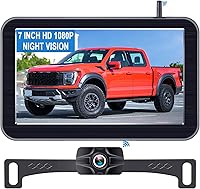
The LeeKooLuu 7-Inch Wireless Truck Backup Camera includes a suction-cup monitor mount and adjustable parking lines. Its camera needs a power connection even though the picture reaches the monitor wirelessly.
This system is described for trucks, so check whether its mounting and wiring suit your car before choosing it. See backup cameras for cars, trucks, and RVs for other vehicle-focused options.
When does a compact monitor make more sense?
A compact monitor can be easier to fit on a crowded dashboard and leaves more room around other controls. Its smaller screen may be a better match if you want a display that's quick to glance at.
The AUTO-VOX 5-Inch Solar Wireless Backup Camera pairs a 5-inch monitor with a solar-assisted battery. Solar charging helps replenish the battery outdoors, while USB Type-C is the main charging method when sunlight isn't enough.
The camera still needs to be mounted and kept charged. Consider how often the car sits outside and whether you can reach the camera for charging if needed.
Could a mirror-style display fit better?
A mirror-style display may suit a car where you don't want another screen on the dashboard. Confirm that the mount works with your existing mirror and that the camera cable can reach the rear.
The AUTO-VOX Rear View Mirror Camera, 4.3-Inch Monitor uses a wired video connection. Its instructions describe connecting the video cable to the reverse lamp for automatic display in reverse, or to constant power for longer viewing.
The system's camera cable is 6 meters long. Check the route and distance in your car before buying, and see our guide to universal backup camera fit for more fit questions.
Can you install an aftermarket camera yourself?
You may be able to install one yourself if you can mount the camera, power the screen, and follow the wiring instructions safely. A wireless system can reduce cable routing, but it doesn't remove all electrical work.
A basic install often includes securing the camera, mounting the display, connecting power, and testing the image. If the camera uses reverse-light power, identify the correct wire and make a secure connection.
Ask an installer for help if the wiring is unclear, the trim is difficult to remove, or you don't have the tools to make a reliable connection. A clean installation matters because loose wiring can interfere with the camera or vehicle components.
After installation, test the image while parked before relying on it. Confirm that the view appears when expected, the camera points where you need it, and the display stays secure.
For a step-by-step check, see how to test a backup camera.
Which backup camera should you choose for an older car?
For an older car, choose based on power, display placement, and installation comfort. A separate wireless monitor can avoid a long video cable, a solar-assisted system can reduce charging needs when parked outdoors, and a wired mirror camera can keep the display close to your normal rear-view glance.
Before you buy, measure the mounting and screen locations, confirm the camera's power requirements, and plan the cable route. If you want an automatic reverse view, verify that the system can connect properly to your car's reverse-light circuit.
Use the car and pickup camera guide to compare vehicle-focused setups, then choose the system that fits your car and install plan.
Frequently asked questions
Can you install a backup camera in a car that never had one?
Yes. Many older cars can use an aftermarket camera with a separate monitor or a compatible mirror display.
Before choosing a system, check where the camera can mount, how it gets power, and whether the display can be placed safely without blocking your view.
Does an aftermarket backup camera need to connect to reverse lights?
Not always. Some systems use reverse-light power to turn on when you shift into reverse, while others can use another power source or a display that you switch on yourself.
Check the system's wiring instructions and your car's electrical setup before connecting anything.
Is a wireless backup camera easier to install in an older car?
It can be easier because the camera sends video to the monitor wirelessly, so you don't need to route a long video cable through the cabin. The camera and screen still need power, and some systems require wiring at the rear of the car.
Can I add a backup camera without replacing the factory radio?
Yes. You can use a system with its own monitor, or a mirror-style camera if its mounting setup works with your car.
If you want the image on the factory radio, first confirm that the radio has a compatible camera input and supports the needed signal.