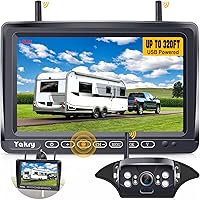
Choosing a Backup Camera for a Fifth Wheel
Choose a fifth wheel backup camera by how you’ll use the view: a wireless rear camera can help with backing and traffic checks, while added side cameras or a wired multi-camera system can show more of a long rig. Check power, monitor placement and camera mounting before you buy.
On this page (7 sections)
- What should a fifth wheel backup camera show?
- Should you choose wireless or wired?
- How will the camera and monitor get power?
- What matters when mounting a camera on a fifth wheel?
- Do you need recording or night vision?
- Which fifth wheel camera setup fits your needs?
- What is the best way to choose a backup camera for a fifth wheel?
A backup camera for a fifth wheel should match your rig length, the views you need and how you plan to power it. A rear camera can help when lining up or checking behind the trailer, while side cameras or a multi-camera system add more angles.
Start with the setup: check whether the fifth wheel is pre-wired, where a monitor can sit in the truck, and how the camera will get power. Then compare wireless signal range, number of camera inputs and recording features.
If you’re still comparing broad system types, see our backup camera systems guide. For more fifth wheel and camper-focused options, browse backup cameras for campers and camper trailers.
What should a fifth wheel backup camera show?
A fifth wheel camera should give you a useful view of the trailer’s rear, with side views if you need to check traffic or navigate tight spaces. Decide which blind areas matter most before choosing the number of cameras.
A single rear camera keeps the setup simpler. Side cameras can help you see along the trailer, but they add mounting, wiring or power decisions and may require a monitor that supports multiple views.
For a long rig, think about the view you need while driving as well as while backing. A camera system does not replace mirrors, careful checks or a spotter when one is available.
When is a rear camera enough?
A rear camera may be enough if your main need is to see behind the fifth wheel while reversing or checking the trailer on the road. Look for a monitor and camera arrangement that lets you see the trailer’s back without obstructing your view through the windshield.
Haloview’s system supports up to 4 wireless camera inputs and has a 7-inch monitor with a 120-degree viewing angle. It is designed for vehicles up to 65 feet, including fifth wheels, according to its product description.
When are side cameras useful?
Side cameras can add a view along the sides of your trailer, which may help when checking nearby traffic or threading through a narrow campground road. They make sense if your monitor can show those views in a way you can read at a glance.
The AUTO-VOX system includes rear and side cameras, and its 7.2-inch monitor supports a three-way split screen with compatible side cameras. It also supports a single view for closer alignment when parking.
For more on matching a multi-camera system to an RV, see our guide to hooking up a backup camera on an RV.
Should you choose wireless or wired?
Choose wireless if you want to avoid running a long video cable between truck and trailer; choose wired if you prefer a direct camera-to-monitor connection and can plan the cable route. Neither setup removes the need to plan power and mounting.
Wireless systems still need power at the camera and monitor. The camera may connect to an existing pre-wire or another suitable power source, depending on the system.
A wired system connects cameras directly to the monitor, but cable routing across a fifth wheel and truck takes planning. Our wireless camera guide explains what to consider about signal and setup.
What should you check about wireless range?
Compare the stated range with your full truck-and-trailer setup, but treat range as a guide rather than a promise of performance in every setting. Obstructions and installation choices can affect the view, so plan to check the connection after installation.
Haloview states a wireless line-of-sight range of up to 984 feet. AUTO-VOX states a transmission range of up to 500 feet and describes dual antennas; both figures refer to the makers’ stated conditions, not a guarantee for every route.
The Pemacom camera uses a digital frequency-hopping signal and has a magnetic mount. Its maker describes it for fifth wheels and other larger vehicles, with solar and USB charging options.
If you are comparing other no-drill options, see our magnetic backup camera guide.
When does a wired multi-camera setup fit?
A wired system may fit if you want several fixed camera angles and can route the camera cables to the monitor. The VOONOA system includes 4 cameras and connects them directly to the monitor, with a stated 12–36V DC input.
Its 10.36-inch monitor can show a quad split view. That larger display and multi-camera layout may suit a setup where you want rear, front or side views together, provided you’re comfortable with the wiring work and monitor placement.
How will the camera and monitor get power?
Check power at both ends before choosing a camera system. Confirm the camera’s power source on the trailer and the monitor’s power source in the truck, then see whether an existing pre-wire can simplify installation.
AUTO-VOX describes connecting its camera to a 12V power source when the RV is not pre-wired, with an adapter bracket and pigtail harness for pre-wired installations. VOONOA describes a single power wire to the monitor and direct camera-to-monitor connections.
Pemacom’s camera can use solar power or USB charging. Its monitor can use a USB cable or a cigarette lighter adapter, so consider whether those charging and power options fit the way you travel.
For more detail on power options, read how wireless backup cameras get power. If you plan to connect a camera to vehicle reverse lights, see our guide to hooking a backup camera to reverse lights.
What matters when mounting a camera on a fifth wheel?
A good mounting spot gives the camera a clear view, a secure base and access to power. Check the trailer surface and mount style before drilling or attaching anything.
A fixed surface mount can suit a camera you plan to leave in place. A magnetic mount can be moved, but it needs a surface that will hold the magnet; Pemacom says buyers with aluminum, plastic or fiberglass surfaces can contact the brand about a metal bracket.
Use the installation instructions for the camera and trailer, and make sure the mount does not block lights, labels or other equipment. After installation, check the picture from the truck and adjust the angle as needed.
Our camera mounting guide covers positioning and aiming. If you add a camera to a trailer without a factory setup, see how to add a backup camera to a travel trailer.
Do you need recording or night vision?
Recording can preserve video from a camera system, while night-vision features can help show the rear view in low light. Treat both as useful features, not substitutes for direct checks or safe driving.
Haloview includes a built-in recorder with video playback and 1080p recording. AUTO-VOX supports DVR recording with a compatible SD card, which is not included.
Pemacom supports loop video recording. VOONOA supports recording from four channels and loop recording, and says its cameras provide night vision up to 50 feet.
Haloview describes full-color viewing in dim light and remotely controlled fill lights for very low light. AUTO-VOX describes infrared night vision.
Compare the type of low-light view and recording setup you want, then check storage needs and controls before deciding.
Which fifth wheel camera setup fits your needs?
Choose a single rear camera if your main goal is to see behind the trailer, a rear-and-side system if you want more views for lane changes, or a multi-camera system if you need several fixed angles. Match the setup to your installation plan and monitor space.
- Haloview BT7: Consider it for a wireless system with up to 4 camera inputs, a built-in recorder and stated support for vehicles up to 65 feet.
- AUTO-VOX: Consider it if rear and side cameras with split-screen viewing fit your driving needs.
- Pemacom: Consider it if you want a magnetic camera with solar and USB charging options.
- VOONOA: Consider it if you want a wired four-camera setup and a quad split monitor.
Before choosing, check the camera mount, trailer power, monitor position and cable or wireless route. For more RV-specific comparisons, browse backup cameras for motorhomes.
What is the best way to choose a backup camera for a fifth wheel?
Pick the simplest system that gives you the views you need: a rear camera for backing, side cameras for added angles, or a wired multi-camera setup for several fixed views. Confirm power, mounting and monitor placement before buying, then use our wireless trailer camera guide to compare towing-focused options.
Frequently asked questions
Where should you mount a fifth wheel backup camera?
Mount the camera where it gives a clear view behind the trailer and can be secured to the surface. Check the camera’s field of view, power route and any existing pre-wire before choosing a position.
Test the view from the monitor and adjust the angle so the trailer edge and space behind it are visible.
Is a wireless camera suitable for a fifth wheel?
A wireless camera can suit a fifth wheel if its signal works across your truck and trailer setup. Compare the system’s stated range with your rig length, then check the maker’s installation guidance.
A long stated range does not guarantee a clear signal in every route or surroundings.
Do you need side cameras on a fifth wheel?
Side cameras can add views alongside the rear view, which may help when checking nearby traffic or moving through narrow campground roads. They add cameras to mount and power, so compare the side-view need with monitor inputs and installation work before choosing a system.
Can a fifth wheel camera run while driving?
Some camera systems support a live view while driving, but the power and installation setup determine whether yours can stay on. Follow the system instructions and keep your attention on the road.
Use the monitor as an additional view, not as a replacement for mirrors or a spotter.